

Kinetix Import / Export
A queue-backed import pipeline with a three-step wizard: choose a file, confirm the column mapping Kinetix guessed for you, review a sample and start. The import runs on the queue and notifies the user when it finishes.
It is built to stay cheap on files of any size. Previewing reads a sample, never the file: the reader stops at the configured row limit, the row count is counted rather than parsed, and the queued job streams the file row by row. A million-row upload costs the dialog the same as a ten-row one.
Excel (
.xls/.xlsx) support usesphpoffice/phpspreadsheet. CSV/TSV are parsed natively. Export is documented in §7.
1. Architecture
| Piece | Responsibility |
|---|---|
Importer (abstract) | Declares target columns, the model, per-row import, queue/chunk config |
ImportColumn | A target column: label, required, rules, alias guesses, value casting |
FileReader | Streams CSV (native) and Excel (phpspreadsheet) — bounded, never whole-file |
ImportController | upload / preview / start endpoints |
ImportProcessor | Queued job: streams rows, validates, imports, notifies, cleans up |
KinetixImporter.vue | The wizard (file → mapping → review), and its subcomponents in components/Importer/ |
KinetixImportModal.vue | Picks the dialog surface (modal / full-screen modal / sheet) |
2. Defining an Importer
namespace App\Kinetix\Importers;

use App\Models\Contact;
use Happones\Kinetix\Imports\Importer;
use Happones\Kinetix\Imports\ImportColumn;

class ContactImporter extends Importer
{
    protected static ?string $model = Contact::class;

    public static function getColumns(): array
    {
        return [
            ImportColumn::make('name')
                ->guess(['nombre', 'full name'])
                ->requiredMapping(),

            ImportColumn::make('email')
                ->guess(['e-mail', 'correo'])
                ->rules(['email'])
                ->castStateUsing(fn ($value) => strtolower(trim((string) $value))),

            ImportColumn::make('phone')
                ->guess(['celular', 'mobile', 'tel']),
        ];
    }

    // Optional: upsert instead of insert by resolving an existing record.
    public function resolveRecord(array $data): ?\Illuminate\Database\Eloquent\Model
    {
        return Contact::firstOrNew(['email' => $data['email'] ?? null]);
    }
}
ImportColumn API
| Method | Description |
|---|---|
::make(string $name) | Target attribute (matches the model column) |
->label(string) | Display label (auto-generated from the name otherwise) |
->requiredMapping(bool = true) | The user must map a source column before starting |
->rules(array|string) | Laravel validation rules applied per row |
->guess(array $aliases) | Extra header names used for automatic mapping |
->castStateUsing(Closure) | Transform the raw value before saving |
->fillRecordUsing(Closure) | Custom write onto the record (fn ($record, $value, $row)) |
Importer API
| Method | Description |
|---|---|
getColumns(): array | The target columns (required) |
protected static $model | The model written to (or override resolveRecord()) |
resolveRecord(array $data): ?Model | Return an existing record for upsert; null inserts |
importRow(array $data): void | Per-row handler (override for custom logic) |
chunkSize(): int | Rows per DB transaction (default 1000) |
queue(): ?string | Queue the job runs on (default queue otherwise) |
context(Request $request): array | Request context captured at dispatch, restored on the worker (see below) |
getContext(): array / $this->context | Read the restored context inside importRow() / resolveRecord() |
token() / fromToken() | Signed class token passed to/from the frontend |
ability(): ?string | Policy ability required to run the import (null = create when the model has a policy) |
authorize(?Authenticatable $user): bool | Override for custom authorization; enforced on every import endpoint |
protected bool $downloadableTemplate = true | Offer a "Download template" link in the import modal |
protected ?string $templateFileName = null | Template filename (null = studly class name, ProductImporter.csv) |
protected ?bool $preview = null | Show the sample-data table (null inherits kinetix.imports.preview) |
protected ?int $previewRows = null | Sample rows — and the reader's ceiling (null inherits config) |
protected ?int $previewColumns = null | Columns shown before the rest fold away, 0 = no cap (null inherits config) |
protected ?string $layout = null | 'auto' | 'modal' | 'fullscreen' | 'sheet' (null inherits config) |
protected ?int $fullscreenThreshold = null | Column count above which 'auto' goes full screen |
protected ?int $maxUploadSize = null | Upload ceiling in kilobytes (null inherits config) |
settings(): ImportSettingsData | The resolved dialog settings sent to the frontend |
isExactMatch(array $headers, array $mapping): bool | Whether the file lines up one-for-one (see below) |
getStartedNotificationBody(): string | Toast shown when the import is queued (see Notifications) |
getCompletedNotificationTitle/Body(int $imported, int $failed): string | Completion notification title/body |
getFailedNotificationTitle/Body(): string | Whole-job failure notification title/body |
Authorization
An import is a write primitive: it creates and updates records of the target model. Every endpoint (upload, preview, start) therefore authorizes before doing anything, so an importer token that reaches a lower-privileged user's page can't be replayed into a bulk write.
By default the target model's create ability is required whenever it has a policy. Narrow it, or take over entirely:
class ProductImporter extends Importer
{
    protected static ?string $model = Product::class;

    // Require a specific ability instead of `create`.
    public function ability(): ?string
    {
        return 'import';
    }

    // …or decide yourself.
    public function authorize(?Authenticatable $user): bool
    {
        return $user?->hasRole('data-team') ?? false;
    }
}
No policy means no check
With no policy on the model, nothing is enforced here and the host owns access — the same convention as record actions. Add a policy or override authorize().
Downloadable template
The import modal shows a Download template link by default — a CSV whose header row is the importer's column labels, which auto-map when the filled file is uploaded back. Opt out or rename per importer:
class ProductImporter extends Importer
{
    protected bool $downloadableTemplate = false;   // hide the link
    protected ?string $templateFileName = 'products.csv'; // default: ProductImporter.csv
}
Served by GET {prefix}/imports/template?importer={token} (kinetix.imports.template) — 404 when the importer disables it. When opening the modal manually (without ImportAction), pass the filename via the template prop / event detail:
window.dispatchEvent(new CustomEvent('kinetix:open-importer', {
    detail: { importer: token, template: 'products.csv' },
}));
Multi-tenancy: carrying the request context into the queue
The queued job runs with no HTTP request — auth()->user(), the current team, session, etc. are all unavailable. If importRow() needs tenant scoping (almost always in a multi-tenant app), override context(): it is called at dispatch time (inside the request), serialized with the job, and restored on the worker instance before any row is imported.
use Illuminate\Http\Request;

class ProductImporter extends Importer
{
    public function context(Request $request): array
    {
        return [
            'team_id' => $request->user()?->currentTeam?->getKey(),
            'user_id' => $request->user()?->getKey(),
        ];
    }

    public function importRow(array $data): void
    {
        Product::create([
            ...$data,
            'team_id' => $this->context['team_id'],   // never "the first team in the DB"
        ]);
    }
}Warning: without this, a queued importer that infers the tenant (e.g.
Team::first()) is a real multi-tenant leak. Keep the returned array to serializable scalars — it travels through the queue payload.
Smart auto-mapping
Importer::guessMapping($headers) matches each column against its name, label, and guess() aliases using a normalized comparison (case/spacing/punctuation insensitive — NOMBRE ≈ name). It is collision-free: each source header is claimed by at most one target column.
Exact matches skip the mapping step
Importer::isExactMatch($headers, $mapping) reports whether the file lines up one-for-one: every target column found a header, and every (non-blank) header was claimed. A file filled in from the downloadable template always satisfies this — the template's header row is the column labels — so the wizard says so and takes the user straight to review. Nothing was guessed, so there is nothing to confirm.
It deliberately fails when a source column goes unclaimed: that column's data would be silently dropped, which is exactly the case the user should see. The mapping step names those columns explicitly ("2 source columns are not mapped and will be ignored: …").
3. Scale: what actually gets read
An import file is allowed to be enormous, so every step is bounded:
| Step | Cost | Why |
|---|---|---|
| Preview | previewRows rows | The reader stops at the limit — a 10-row preview parses 10 rows on a 1M-row file |
| Row count | One pass, no parsing | CSV newlines are counted in 1 MB blocks; a spreadsheet reports its own row count via listWorksheetInfo(), with no cells loaded |
| Queued import | chunkSize() rows in memory | FileReader::stream() is a generator: the job holds one chunk, never the file |
| Failed rows | One row at a time | Skipped rows are written to the downloadable CSV as they happen, not collected |
Spreadsheets (.xls/.xlsx) have no streaming reader — loading one materializes every cell — so they are read in windows of spreadsheet_chunk_size rows, re-opening the file per window (RowWindowFilter). The first worksheet is the one read.
The row count is a label, not a contract
It is intentionally cheap rather than exact: a CSV field containing a literal newline counts more than once. The number labels the dialog ("1,204,882 rows detected") — it never drives the import, which streams the real records.
Configuration
// config/kinetix.php
'imports' => [
    'max_upload_size'        => env('KINETIX_IMPORT_MAX_UPLOAD_SIZE', 102400),   // KB
    'preview'                => env('KINETIX_IMPORT_PREVIEW', true),
    'preview_rows'           => env('KINETIX_IMPORT_PREVIEW_ROWS', 10),
    'preview_columns'        => env('KINETIX_IMPORT_PREVIEW_COLUMNS', 8),        // 0 = no cap
    'layout'                 => env('KINETIX_IMPORT_LAYOUT', 'auto'),
    'fullscreen_threshold'   => env('KINETIX_IMPORT_FULLSCREEN_THRESHOLD', 12),
    'spreadsheet_chunk_size' => env('KINETIX_IMPORT_SPREADSHEET_CHUNK', 2000),
],
Any importer overrides the lot per class:
class WideProductImporter extends Importer
{
    protected ?int $previewRows = 5;        // sample 5 rows instead of 10
    protected ?int $previewColumns = 0;     // no column cap in the preview
    protected ?string $layout = 'fullscreen'; // always take the room
    protected ?int $maxUploadSize = 512000; // 500 MB, for a very large export dump
}

class SensitiveImporter extends Importer
{
    protected ?bool $preview = false;       // map the columns, never show the cells
}
max_upload_size is enforced on the upload endpoint (from the importer, not the config, when it overrides it). PHP's own upload_max_filesize and post_max_size still cap it — raise those first.
4. Endpoints
All under the configured Kinetix route prefix (default _kinetix), using the web+auth middleware:
| Route | Purpose |
|---|---|
GET {prefix}/imports/template | Download the importer's CSV template (404 when disabled) |
POST {prefix}/imports/upload | Store the file, return preview + auto-mapping |
POST {prefix}/imports/preview | Re-parse the stored file with new CSV options |
POST {prefix}/imports/start | Validate required mappings and dispatch the job |
The importer class travels as an encrypted token (Importer::token()), and the stored file is referenced by an encrypted fileToken constrained to the kinetix-imports directory.
5. Frontend
Pass the importer token to the page and render KinetixImporter:
// Controller
return inertia('Contacts/Import', [
    'importer' => ContactImporter::token(),
]);<script setup lang="ts">
import KinetixImporter from '@/components/kinetix/KinetixImporter.vue';
defineProps<{ importer: string }>();
</script>
<template>
<KinetixImporter :importer="importer" />
</template>The three steps
| Step | What it holds |
|---|---|
| 1 · File | Drop zone (also a real file input — drag-and-drop is never the only way in), the chosen file with its size, the Download template link, and the Reading options — collapsed, with the current settings still stated in its summary line |
| 2 · Mapping | One labelled select per target column, pre-selected from the auto-mapping, with already-claimed source columns disabled so one source is never reused. Searchable, filterable to "unmapped only", resettable to the suggestions, with a 18 / 24 fields mapped counter — and it names the source columns the import would otherwise silently drop |
| 3 · Review | A summary (file, rows, mapped fields, ignored columns), the bounded sample table, and Start import |
A file that lines up one-for-one skips step 2 and lands on review directly. Start import stays disabled until every required column is mapped, and the mapping step says how many are still missing.
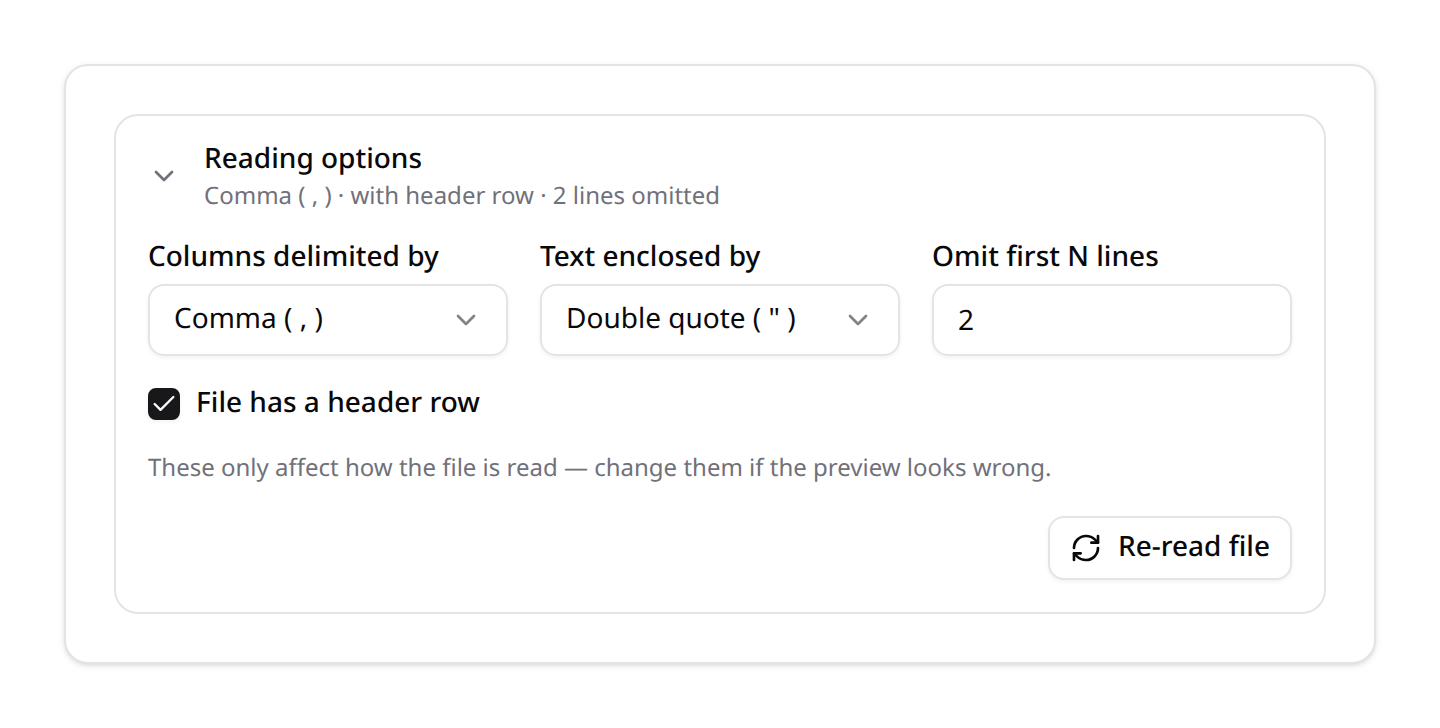
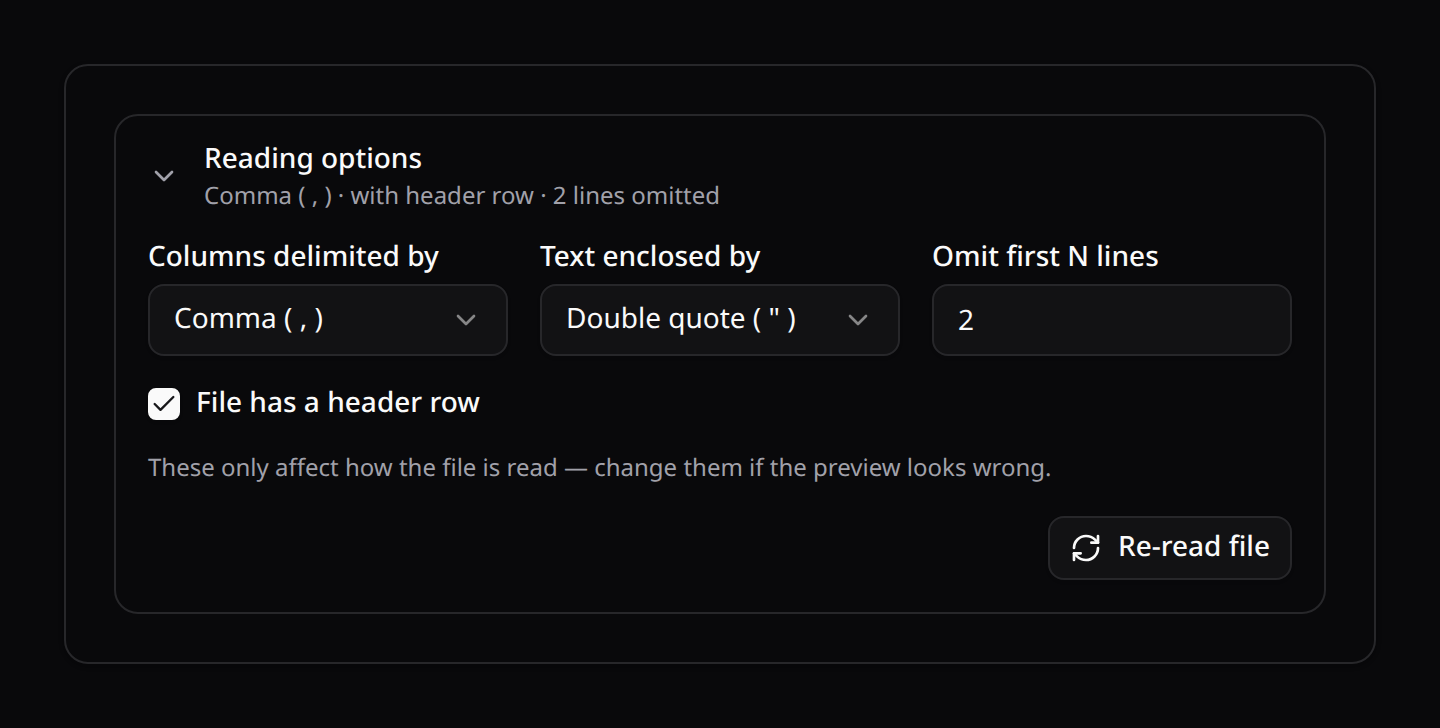
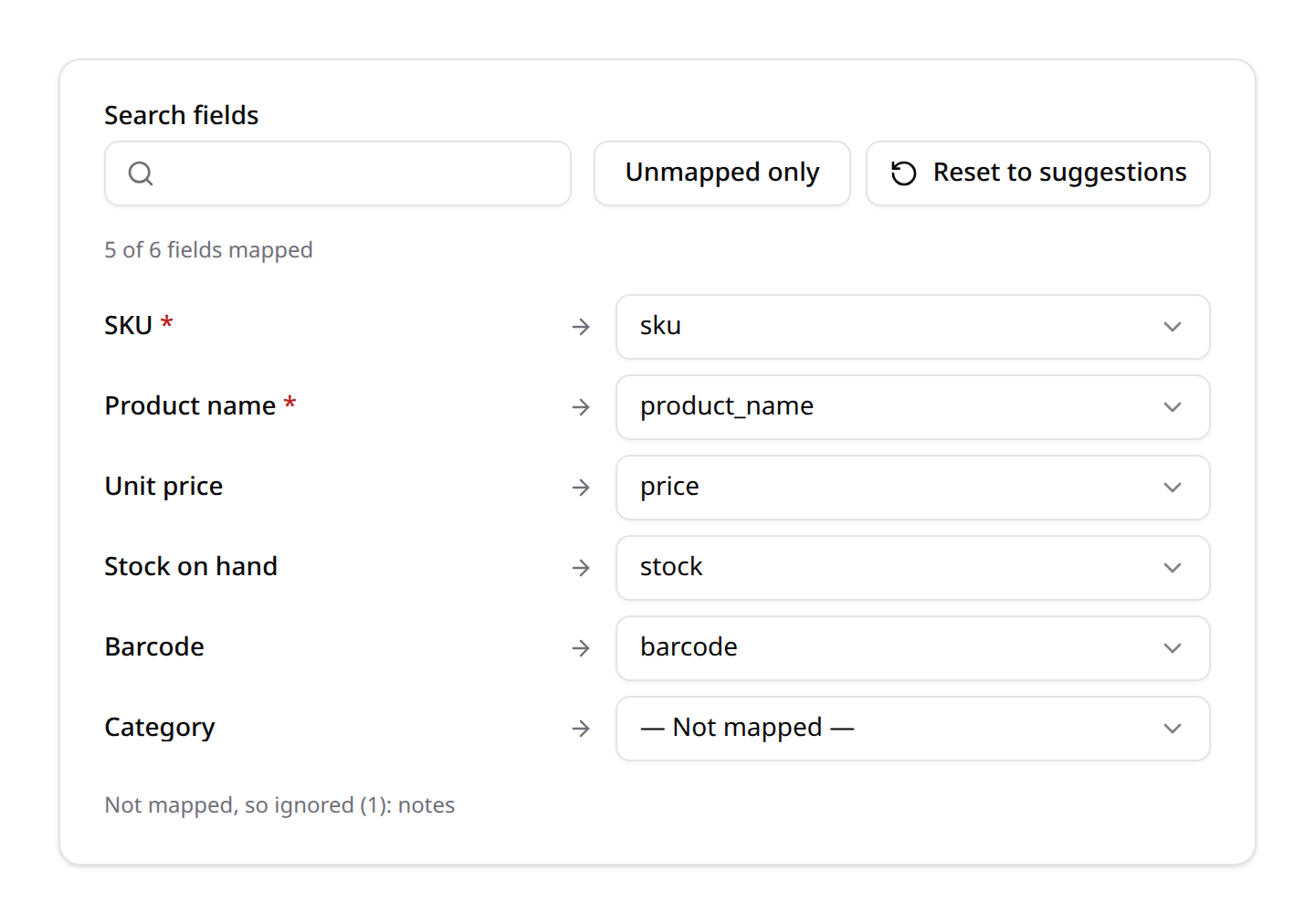
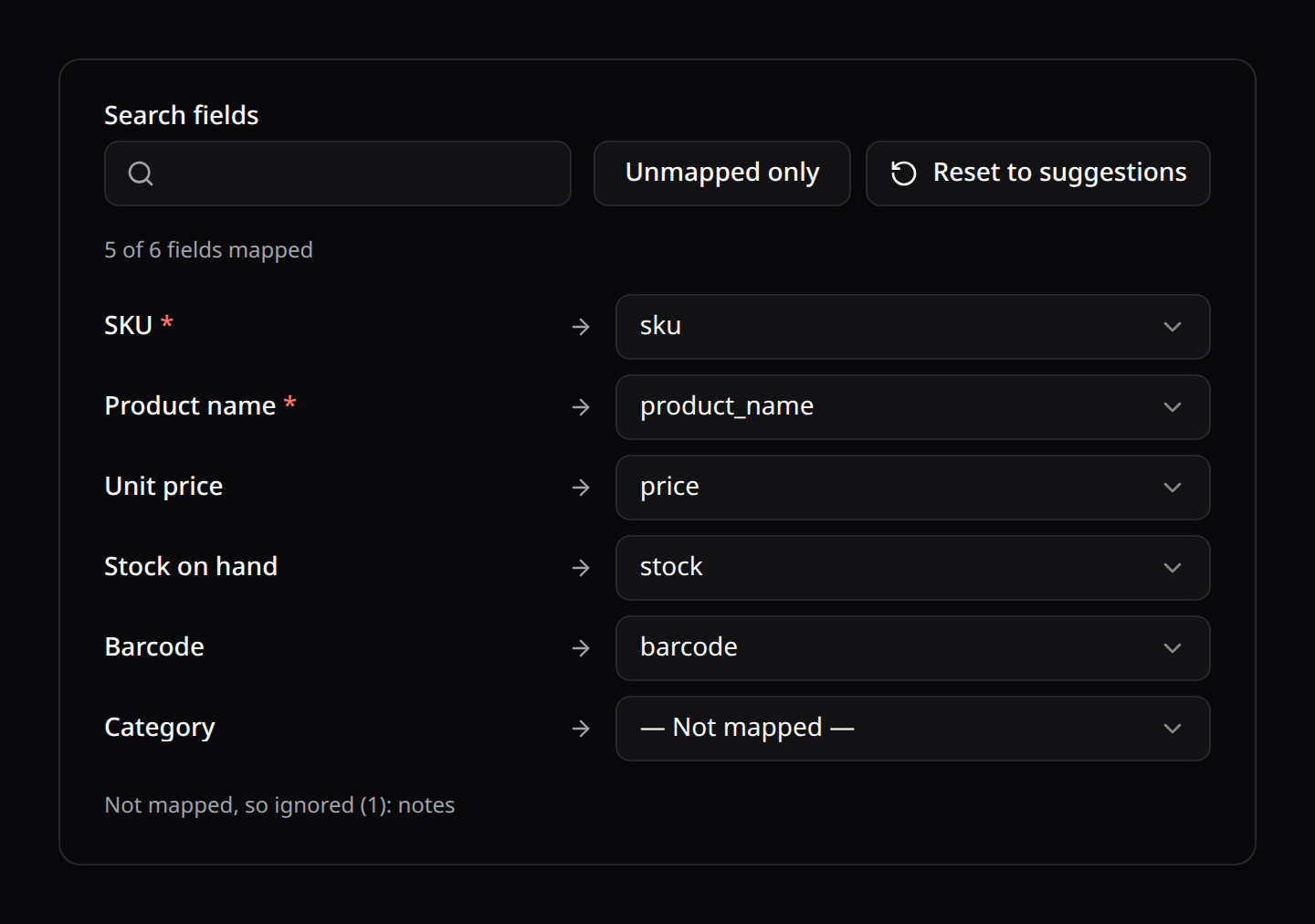
The reading options are a <KinetixCollapsible> primitive (open / defaultOpen / title / summary / bare props, #trigger slot) — a shadcn Collapsible built on Reka UI, animating its real height, reusable anywhere you want a disclosure and not only here. Its field grid measures its own width rather than the viewport's, which is the point: this form lives in a dialog whose width does not follow the screen, so viewport breakpoints squeezed it into columns the labels could not fit.
Why three steps rather than one panel: a single scrolling panel had to hold the options, one select per column and a full-width preview at once, so a file with twenty or more columns grew the dialog past the viewport and stranded its own actions. Each step is bounded now, and the file's width only affects the step actually showing it.
The pieces live in components/Importer/ (ImporterSteps, ImporterDropzone, ImporterOptions, ImporterMapping, ImporterPreview) with the state machine in composables/useKinetixImporter.ts, so the wizard's steps stay presentational.
Where it renders: surface
KinetixImporter never assumes it owns the page, because what should scroll depends on where it sits:
surface | Who scrolls |
|---|---|
inline (default) | The page. Use it for a wizard placed on a page of its own |
modal | The wizard's own bounded scroller, capped so the dialog stays put |
fullscreen | The wizard's scroller, filling the panel |
sheet | Nobody new — KinetixSheet already scrolls its body |
KinetixImportModal sets this for you (below). Set it yourself only when you place the wizard in a shell of your own.
Quickest: the prebuilt ImportAction
ImportAction::make()->importer(...) opens the import preview in a dialog automatically — just mount the global <KinetixImportModal /> once in your layout:
use Happones\Kinetix\Actions\ImportAction;

$table->headerActions([
    ImportAction::make()->importer(ContactImporter::class),
]);<!-- once, in your app layout -->
<KinetixImportModal />Clicking the action fires kinetix:open-importer (with the importer as a signed token); KinetixImportModal catches it and renders KinetixImporter in a shadcn dialog. ImportAction is a normal Action (->label()/->icon()/->authorize()…). Give each a unique name when you have several: ImportAction::make('importBrands')->importer(BrandImporter::class).
The event carries the importer's resolved settings, so the dialog can present itself correctly before a file even exists.
The dialog sizes itself to the file
One size does not fit every file: a three-column CSV is a dialog, a twenty-four-column one needs the room. With the default layout: 'auto', the dialog promotes itself to a full-screen modal once the parsed file exceeds fullscreenThreshold columns (12 by default).
It is the same KinetixModal, only bigger — the wizard is resized, never remounted, so a mapping the user already adjusted survives the change.
layout | Behaviour |
|---|---|
'auto' (default) | Modal, promoting itself to full screen past the column threshold |
'modal' | Always the normal dialog |
'fullscreen' | Always full screen |
'sheet' | An edge panel (KinetixSheet), decided up front |
Why 'sheet' never escalates automatically
Swapping the modal for a sheet mid-flow means unmounting the wizard, which would discard the file and the mapping the user already fixed. A sheet is therefore an explicit per-importer choice, and the automatic escalation stays within one component.
class WideProductImporter extends Importer
{
    protected ?string $layout = 'fullscreen';    // or 'sheet' / 'modal'
    protected ?int $fullscreenThreshold = 8;     // escalate sooner under 'auto'
}
The sample table
Bounded on both axes, and both bounds are yours to set:
- Rows —
previewRows(10). This is the reader's ceiling too, so it is literally how much of the file is parsed. - Columns —
previewColumns(8). The rest fold behind a "Show N more columns" toggle rather than turning the dialog into a horizontal scroll.0shows them all. The table scrolls inside its own container, so the dialog never scrolls sideways. - Off entirely —
protected ?bool $preview = false. The mapping still works (it only needs the headers); no cell values are shown or even parsed.
Recipe (manual): open the importer from a table toolbar action
If you prefer to place the importer yourself (inline section, custom modal), use a plain action that fires a browser event and show KinetixImporter when the page hears it.
1. Toolbar action (on the table) dispatches an event instead of navigating:
use Happones\Kinetix\Actions\Action;

$table->toolbarActions([
    Action::make('import')->label('Import')->icon('upload')->dispatch('open-importer'),
]);
2. Pass the importer token to the same page that renders the table:
return inertia('Contacts/Index', [
    'table'    => ContactResource::table(Table::make(Contact::query()))->toArray(),
    'importer' => ContactImporter::token(),
]);
3. The page listens for kinetix:open-importer and shows the importer in a dialog. Use KinetixModal — it owns the focus trap, Escape, and the bounded panel — and tell the wizard which surface it is in, so it brings its own bounded scroller:
<script setup lang="ts">
import { computed, onBeforeUnmount, onMounted, ref } from 'vue';
import KinetixTable from '@/components/kinetix/KinetixTable.vue';
import KinetixImporter from '@/components/kinetix/KinetixImporter.vue';
import KinetixModal from '@/components/kinetix/primitives/KinetixModal.vue';

defineProps<{ table: any; importer: string }>();

const showImporter = ref(false);
const columns = ref(0);

const open = () => {
    columns.value = 0;
    showImporter.value = true;
};

onMounted(() => window.addEventListener('kinetix:open-importer', open));
onBeforeUnmount(() => window.removeEventListener('kinetix:open-importer', open));

// The same escalation `KinetixImportModal` does for you.
const fullscreen = computed(() => columns.value > 12);
</script>

<template>
  <KinetixTable :table="table" />

  <KinetixModal
    :open="showImporter"
    title="Import contacts"
    :max-width="fullscreen ? 'sm:max-w-[95vw]' : 'sm:max-w-3xl'"
    :fullscreen="fullscreen"
    @update:open="showImporter = $event"
  >
    <KinetixImporter
      :importer="importer"
      :surface="fullscreen ? 'fullscreen' : 'modal'"
      @update:columns="columns = $event"
      @started="showImporter = false"
      @cancel="showImporter = false"
    />
  </KinetixModal>
</template>
Emits worth wiring: update:columns (the parsed file's source-column count — what the escalation reads), started (the import was queued), cancel (the user backed out of step 1).
The import itself is queued; the user gets a completion notification when it finishes. Reload the table afterwards with router.reload({ only: ['table'] }) (e.g. on a notification action or a manual refresh).
6. The Queued Job
ImportProcessor streams the file (FileReader::stream() is a generator, so the job holds one chunk of rows, never the file), maps each row by the chosen header indices, validates mapped columns against their rules(), calls importRow() per row inside chunked transactions, deletes the temp file, and finishes by sending a Kinetix notification:
Import complete—:imported imported, :failed skipped(statussuccess, orwarningif any rows were skipped). A row that fails validation or whoseimportRow()throws is skipped, never fatal — the first 10 failures are listed in the notification body with their row number and reason.- When any rows failed, the notification also carries a Download failed rows action: a CSV of every failed source row (row number, the original cells, and the reason), behind the same signed, user-bound, expiring download token exports use. Rows are written to it as they fail, so a wholly mismatched million-row file doesn't hold a million rows in worker memory on the way there.
- Sent via
broadcast()when Echo is configured, otherwise persisted withsendToDatabase().
Customize the dispatch by overriding queue() and chunkSize(), the whole per-row behaviour via importRow() / resolveRecord(), and every notification message via the get*Notification* hooks (see Notifications).
7. Export
A queued Exporter streams records (CSV) or builds a workbook (Excel) to storage, then sends the user a download notification carrying a signed, time-unguessable download link.
Storage disk. Exports and the temporary import file both use
kinetix.filesystem.private_disk(defaultlocal), not the publickinetix.filesystem.diskthat serves uploads and image columns. Generated artifacts must not be reachable by URL: on a public disk they sit at a guessable/storage/…path with no authentication, which turns the token-guarded download route into a side door. Because CSV/XLSX read & write need a real local path, cloud disks are bridged automatically: exports write to a temp file then upload to the disk, and imports stream the file to a temp path for parsing (handled byHappones\Kinetix\Support\KinetixDisk). The signed download token carries the disk it was written to.
Defining an Exporter
namespace App\Kinetix\Exporters;

use App\Models\Contact;
use Happones\Kinetix\Exports\Exporter;
use Happones\Kinetix\Exports\ExportColumn;

class ContactExporter extends Exporter
{
    protected static ?string $model = Contact::class;

    public function format(): string
    {
        return 'xlsx'; // 'csv' (default), 'xlsx', or 'pdf'
    }

    public static function getColumns(): array
    {
        return [
            ExportColumn::make('name')->label('Full Name'),
            ExportColumn::make('email'),
            ExportColumn::make('created_at')
                ->label('Registered')
                ->formatStateUsing(fn ($value) => $value?->format('Y-m-d')),
        ];
    }

    // Optional: scope/filter what gets exported.
    public function query(): \Illuminate\Database\Eloquent\Builder
    {
        return Contact::query()->where('is_active', true);
    }
}
Dispatching
// Anywhere (controller, table toolbar action target, command):
(new ContactExporter())->export($request->user());
The export runs on the queue. When finished, the recipient gets a Kinetix notification (Export ready) with a Download action button. The link opens in a new tab and streams the file as an attachment.
PDF exports
Return 'pdf' from format() to produce a printable PDF (a landscape A4 table of the exported rows, the first row as the header). PDF rendering uses the optional dompdf/dompdf package — install it once:
composer require dompdf/dompdfpublic function format(): string
{
return 'pdf';
}If dompdf isn't installed, a PDF export fails fast with an install hint. csv and xlsx need nothing extra.
Quickest: the prebuilt ExportAction
No route or controller needed — ExportAction::make()->exporter(...) posts to a built-in endpoint (kinetix.exports.start) that dispatches the queued export and notifies the user. Drop it in the toolbar (exports the exporter's query) and/or as a bulk action (exports the selected rows — their ids are sent automatically):
use Happones\Kinetix\Actions\ExportAction;

$table
    ->headerActions([                                  // toolbarActions() alias
        ExportAction::make()->exporter(ContactExporter::class),  // export all
    ])
    ->bulkActions([
        ExportAction::make()->exporter(ContactExporter::class),  // export selected
    ]);
Bulk exports are scoped to the selected rows automatically — Exporter::resolveExportQuery() narrows your query() to the selected ids (whereKey). You do not need to read parameter('ids') in query(); selecting 2 rows exports exactly those 2, and the toolbar/header copy (no selection) exports the whole query(). Override query() only to add your own base filters:
public function query(): \Illuminate\Database\Eloquent\Builder
{
    return Contact::query()->where('active', true); // bulk ids are still applied on top
}
ExportAction is a normal Action, so ->label(), ->icon(), ->color(), ->authorize(), ->visible() all apply. The exporter travels as a signed token; the built-in endpoint validates it and dispatches (new Exporter())->export($request->user(), ['ids' => …]).
Note: the toolbar
ExportActionexports the exporter'squery(), not the table's current on-screen filters (those live only in the browser's query string). Scope what's exported in the exporter'squery()/ via parameters. The manual recipe below shows full control when you need it (e.g. a custom route reading filter values).
Inside a relation manager the same action is automatically scoped to the parent's relationship — the export intersects your query() with the relation's keys, so it ships only the parent's related records. See Relation Managers → Relation-scoped export.
Recipe (manual): export from a table — toolbar (all) + bulk (selected)
When you need full control (custom route, applying the table's filters, extra options), wire it yourself: one Export button in the table toolbar that exports the whole table, and the same action as a bulk action that exports only the selected rows. The bulk invocation sends the selected ids; the exporter scopes its query to them.
1. Scope the exporter by the selected ids (no-op when none are passed):
class ContactExporter extends Exporter
{
    protected static ?string $model = Contact::class;

    public static function getColumns(): array
    {
        return [ExportColumn::make('name'), ExportColumn::make('email')];
    }

    public function query(): \Illuminate\Database\Eloquent\Builder
    {
        return Contact::query()
            // Selected-rows export: only the ids the bulk action sent.
            ->when($this->parameter('ids'), fn ($q, $ids) => $q->whereKey($ids));
    }
}
2. The export route reads the (optional) ids and passes them to the exporter:
Route::post('/contacts/export', function (Request $request) {
    (new ContactExporter())->export(
        $request->user(),                       // notification recipient
        ['ids' => $request->input('ids', [])],  // empty = whole table
    );

    return back(); // the file arrives via the "Export ready" notification
})->name('contacts.export');
3. Wire the same action into the toolbar and bulk slots:
use Happones\Kinetix\Actions\Action;

$export = Action::make('export')
    ->label('Export')
    ->icon('download')
    ->inertiaVisit(route('contacts.export'), ['method' => 'post', 'preserveScroll' => true]);

$table
    ->toolbarActions([$export])  // exports the whole filtered table
    ->bulkActions([$export]);    // exports only the checked rows (sends `ids`)
How the ids travel: a bulk action automatically merges the selected ids into the request (inertiaVisit → $request->input('ids'); dispatch → e.detail.ids). The toolbar/footer copy sends none, so parameter('ids') is empty and the whole query() exports. Put $export in footerActions([$export]) too if you want an "Export" at the bottom of the table.
The
->export($recipient, $parameters)parameters travel through the queued job (they must be serializable — ids, filter values, etc.) and are read insidequery()via$this->parameter('key').
Exporter / ExportColumn API
Exporter method | Description |
|---|---|
getColumns(): array | The exported columns (required) |
protected static $model / query() | Source records (override query() to filter) |
format(): string | 'csv' (default) or 'xlsx' |
fileName(): string | Download file name without extension |
chunkSize(): int | Records per query chunk (default 1000) |
queue(): ?string | Queue the job runs on |
export(?Model $recipient, array $parameters = []): void | Dispatch the queued export + notify the recipient. $parameters (e.g. ['ids' => [...]]) reach the exporter inside the job |
parameter(string $key, $default = null) | Read a runtime parameter inside query() (e.g. the selected ids) |
withParameters(array): static | Set parameters on an instance (used by the job; export() is the usual entry point) |
getStartedNotificationBody(): string | Toast shown when the export is queued (see Notifications) |
getCompletedNotificationTitle/Body(int $exported, int $failed): string | Completion notification title/body |
getFailedNotificationTitle/Body(): string | Whole-job failure notification title/body |
ExportColumn method | Description |
|---|---|
::make(string $name) | Source attribute (dot-notation aware, enum friendly) |
->label(string) | Column heading |
->formatStateUsing(Closure) | Transform the value (fn ($value, $record)) |
Authorization
Exporter::ability() / Exporter::authorize() mirror the importer API and are enforced by the export-start endpoint, defaulting to the model's viewAny ability when it has a policy.
Scope the data in query(): a bulk export's selected ids are applied on top of that query, so they can only ever narrow what it already allows — but a default query() is unscoped.
class InvoiceExporter extends Exporter
{
    protected static ?string $model = Invoice::class;

    public function query(): Builder
    {
        return Invoice::where('team_id', auth()->user()->currentTeam->getKey());
    }
}
Download endpoint & security
GET {prefix}/exports/download?token=… (named kinetix.exports.download) streams the file. The token is an encrypted payload of the stored path + download name, constrained to the kinetix-exports directory, bound to the user it was minted for and expiring after kinetix.exports.download_ttl minutes (default 24h) — so a link that leaks out of a mailbox or a proxy log is not a standing grant. The route also sits behind the configured web+auth middleware.
Teams. The export endpoints (
exports/startandexports/download) are the one Kinetix group registered without the{current_team}prefix: both URLs are built server-side and token-signed, and the download link is generated inside a queued job, which has no team route context. Team scoping of the exported data belongs in the exporter's ownquery(), fed by the samecontext()hook importers have — below.
Multi-tenancy: scoping an export to the team it was started from
An export runs on the worker, where there is no request and no current team. Override context() — called when the export is started, inside the request — and read it back in query():
use Illuminate\Database\Eloquent\Builder;
use Illuminate\Http\Request;

class ProductExporter extends Exporter
{
    public function context(Request $request): array
    {
        return ['team_id' => $request->user()?->currentTeam?->getKey()];
    }

    public function query(): Builder
    {
        return Product::query()->where('team_id', $this->context['team_id'] ?? null);
    }
}Warning: an unscoped
query()exports every tenant's rows. The context travels in the queue payload — keep it to serializable scalars.
8. Notifications: lifecycle & custom messages
Wiring an ExportAction / ImportAction to a class is all it takes — the full notification lifecycle is automatic:
| Moment | Delivery | Default message |
|---|---|---|
| Queued | Local toast, immediately | "Export/Import queued. You will be notified when it finishes." |
| Completed | Database notification (bell) — broadcast in real time when Echo is configured | "Export ready" + Download action / "Import complete — :imported imported, :failed skipped" |
| Completed with skipped rows | Same, status warning | Export: ":count rows could not be exported and were skipped." Import: the first 10 failing rows with row number + reason, plus a Download failed rows action — a CSV of every failed row (number, original cells, reason) behind a signed, user-bound, expiring link |
| Job failed (all retries exhausted) | Database notification, status danger | "Export/Import failed. Please try again." |
Rows are skipped, never fatal: a record whose mapRecord() throws (export) or a row that fails validation / whose importRow() throws (import) is counted and reported, and the rest of the file still goes through.
Customizing every message
Override the notification hooks on the exporter/importer — no other wiring:
class ContactExporter extends Exporter
{
    // Toast shown the moment the action queues the export.
    public function getStartedNotificationBody(): string
    {
        return 'Generating your contacts file…';
    }

    public function getCompletedNotificationTitle(int $exported, int $failed): string
    {
        return "Contacts export ready ({$exported} rows)";
    }

    public function getCompletedNotificationBody(int $exported, int $failed): string
    {
        return $failed > 0
            ? "{$failed} contacts could not be exported."
            : 'Your file is ready to download.';
    }

    public function getFailedNotificationTitle(): string { /* … */ }
    public function getFailedNotificationBody(): string { /* … */ }
}
Importer exposes the same five hooks ($imported/$failed instead of $exported/$failed). The import job appends the per-row failure detail after your getCompletedNotificationBody() line automatically.
Completion notifications need the bell
The queued toast is client-side and always works, but the completion and failure notifications are database notifications sent from the queue worker. For the user to see them you need:
KINETIX_DATABASE_NOTIFICATIONS=true(renders them in the<KinetixNotifications />bell — mount it in your layout, see Notifications), Laravel'snotificationstable (php artisan make:notifications-table), and a running queue worker.- Optionally
KINETIX_NOTIFICATIONS_BROADCAST=true+ Echo/Reverb so they arrive as a live toast + sound without a page visit — otherwise they appear in the bell on the next navigation.
With both flags off, completion notifications are persisted but never surfaced.