

Getting Started
Kinetix is a UI toolkit for Laravel + Vue 3 + Inertia.js apps built on the shadcn-vue starter-kit stack. This guide gets it installed and mounted; then head to any feature in the sidebar.
Requirements
| Dependency | Version |
|---|---|
| PHP | ^8.3 |
| Laravel | ^11 | ^12 | ^13 |
inertiajs/inertia-laravel | ^2 | ^3 |
| Vue | ^3.5 |
@inertiajs/vue3 | ^3.0 |
| Pinia | ^2.3 (state management — required) |
vue-i18n | ^11.0 |
vue-sonner | ^2.0 (toasts) |
@lucide/vue | ^1.0 (icons) |
@laravel/echo-vue | ^2.3 (required — KinetixNotifications imports it at build time; inert until Echo is configured) |
@tanstack/vue-table | ^8.0 (only for client-side tables — ->clientSide()) |
@tanstack/vue-virtual | ^3.0 (required — Comments / Kanban / Media Library import it at build time) |
| shadcn-vue / Reka UI | any (components.json present) |
1. Install the package
composer require happones/kinetixThe service provider is auto-discovered — no manual registration needed.
2. Publish the assets
# Config → config/kinetix.php
php artisan vendor:publish --tag=kinetix-config

# Vue components, stores & TypeScript types → resources/js/
php artisan vendor:publish --tag=kinetix-components

# Translations → lang/{locale}/kinetix.php (en, es, fr, pt, zh, ja, ru)
# English-only app? Select what gets published in config/kinetix.php:
#   'translations' => ['locales' => ['en']],        // or KINETIX_TRANSLATION_LOCALES=en
php artisan vendor:publish --tag=kinetix-translations

# Notification sound → public/vendor/kinetix/
php artisan vendor:publish --tag=kinetix-assets

# Fallback shadcn design tokens — ONLY if your app is not a shadcn-vue starter kit
php artisan vendor:publish --tag=kinetix-styles

# Per-module agent skills → .claude/skills/kinetix-* (kinetix:install does this
# for you). Coding agents only load skills from the project, never from vendor/.
php artisan vendor:publish --tag=kinetix-skills
Agent skills
Kinetix ships a skill per module (kinetix-permissions, kinetix-tables, kinetix-membership, …) documenting the API and the integration mistakes each module invites. They are only visible to your coding agent once they live in the project, which is why kinetix:install publishes them by default (--skip-skills opts out) and kinetix:upgrade refreshes them. Different agent tooling? Point it elsewhere:
// config/kinetix.php
'skills_path' => '.agents/skills',   // or KINETIX_SKILLS_PATH
Upgrading — automatic
kinetix:install registers @php artisan kinetix:upgrade in your composer.json's post-autoload-dump, so every composer install/update re-publishes the volatile published assets — components (+ composables, stores, TS types), translations (recompiling the Vue i18n bundle when laravel-vue-i18n-generator is installed) and the agent skills. It only refreshes targets you have already published, and skips apps that never adopted them.
Because the hook overwrites the published copies, treat them as vendor-managed: customize via wrappers, slots, props and config — not by editing the published files. If you do maintain local edits, remove the hook from composer.json and re-publish manually with --force, reviewing the changelog entries marked (published).
Keep your formatters off them too. The Laravel Vue starter kit's scripts (prettier --write resources/, repo-wide eslint) sweep the published paths, so a plain npm run format reformats the vendor-managed copies — and the next upgrade overwrites them again, churning your diff on every composer update. kinetix:install appends the publish paths to .prettierignore automatically; if eslint lints resources/, mirror them in your flat config:
// eslint.config.js
{
  ignores: [
    'resources/js/components/kinetix/**',
    'resources/js/composables/useKinetix*',
    'resources/js/composables/kinetix*',
    'resources/js/stores/kinetix*.ts',
    'resources/js/plugins/kinetix*.ts',
    'resources/js/icons/kinetixBrands*',
    'resources/js/types/index.ts',
    'resources/js/vue-i18n-locales*',
  ],
}
Installed Kinetix before this guard existed? Re-run php artisan kinetix:install (idempotent) or add the block by hand.
3. Compile translations for Vue
Kinetix ships its UI strings as PHP translation files and compiles them to TypeScript for the Vue components via happones/laravel-vue-i18n-generator. This is a separate, optional package — Kinetix does not depend on it, so install it first to get the vue-i18n:generate command:
composer require happones/laravel-vue-i18n-generator
php artisan vue-i18n:generate
Already using another vue-i18n toolchain? Skip this — just make sure the
kinetixnamespace strings end up where your Vue i18n setup loads them.
Run this again whenever you publish translations or add a locale.
Compiling with flags? kinetix:upgrade re-runs vue-i18n:generate after every translation re-publish — with the options from kinetix.translations.vue_i18n_options. If your app compiles per-locale files, mirror the flag there or upgrades will regenerate the single-file bundle you don't import and leave the files you do import stale (raw kinetix.* keys in the UI):
// config/kinetix.php
'translations' => [
    'vue_i18n_options' => ['--multi-locales' => true],
],
4. Run the installer
Kinetix's published Vue components import a few npm packages. The installer adds them to your package.json and installs them, creates a Pinia store, and registers Pinia + Vue i18n in your Inertia entry file (app.ts / app.js):
php artisan kinetix:install

# add chart/widget deps (@unovis/vue, @unovis/ts):
php artisan kinetix:install --charts

# add the client-side table dep (@tanstack/vue-table):
php artisan kinetix:install --tanstack

# skip the App\Providers\KinetixServiceProvider scaffold (created by default):
php artisan kinetix:install --skip-provider
It installs these core runtime dependencies (vue and @inertiajs/vue3 are assumed from your starter kit): pinia, vue-i18n, reka-ui, @internationalized/date, @lucide/vue, vue-sonner, @tanstack/vue-virtual (Comments/Kanban/Media Library import it at build time) and @laravel/echo-vue (KinetixNotifications imports it at build time; it stays inert until you configure Echo — the old --broadcasting flag is now a no-op). The --charts and --tanstack flags add the optional, feature-specific packages (--tanstack covers @tanstack/vue-table for ->clientSide() tables).
It also wires the pieces components depend on: vue-i18n + Pinia registration in app.ts, the kinetix:upgrade composer hook, formatter ignores for the published paths, and @import 'vue-sonner/style.css'; in resources/css/app.css — without that import, toasts render as unstyled plain text (no container, animation, or colors).
Animations require
tw-animate-css. Kinetix surfaces (modals, menus, popovers, tooltips) animate with the shadcnanimate-in/animate-oututilities, provided bytw-animate-css— the Laravel Vue starter kit ships it (@import 'tw-animate-css';inapp.css). On a non-starter-kit host, add it (npm i tw-animate-css) or the surfaces appear/disappear with no motion (functionally fine, visually flat).
If you see a Vite error like Failed to resolve import "@internationalized/date", a required dependency is missing — run
php artisan kinetix:install(or install the package listed above manually).
A dedicated service provider (default)
Kinetix registration (feature permissions, module content, gates) grows over time. Rather than piling it into AppServiceProvider, it belongs in a dedicated provider. kinetix:install scaffolds app/Providers/KinetixServiceProvider.php and registers it in bootstrap/providers.php by default (idempotent — safe to re-run, and an existing provider file is never overwritten). Opt out with:
php artisan kinetix:install --skip-providerEvery piece of Kinetix registration goes in that provider — never in AppServiceProvider. Resources under app/Kinetix/Resources are auto-discovered (see Permissions), so the provider only holds your non-resource features and module content. And to keep the provider itself from growing into a thousand-line file, keep each module's content in its own small "registrar" class under app/Kinetix (a class that just declares/returns its content) and call it from the provider's boot():
protected function registerModules(): void
{
    \App\Kinetix\SpotlightSources::register();  // KinetixSpotlight::register([...])
    \App\Kinetix\ScheduledReports::register();  // KinetixReports::register(...)
    \App\Kinetix\PdfTemplates::register();      // KinetixPdf::register(...)
    \App\Kinetix\WebhookEvents::register();
    \App\Kinetix\OnboardingSteps::register();
}
This keeps AppServiceProvider limited to framework-level defaults and gives every module a single, predictable home.
Manual Installation & Configuration
If you prefer to configure everything manually:
4.1 Install dependencies
Install the core runtime dependencies (add @unovis/vue @unovis/ts for charts and @tanstack/vue-table for client-side tables):
npm install pinia vue-i18n@11 reka-ui @internationalized/date @lucide/vue vue-sonner @tanstack/vue-virtual @laravel/echo-vuepnpm add pinia vue-i18n@11 reka-ui @internationalized/date @lucide/vue vue-sonner @tanstack/vue-virtual @laravel/echo-vueyarn add pinia vue-i18n@11 reka-ui @internationalized/date @lucide/vue vue-sonner @tanstack/vue-virtual @laravel/echo-vue4.2 Initialize Pinia store
Create a stores/index.ts (or index.js) file inside resources/js/:
import { createPinia } from 'pinia'

const pinia = createPinia()

export default pinia
4.3 Register in your entry file
In your main Inertia entry file (typically resources/js/app.ts or resources/js/app.js), register vue-i18n and pinia using the withApp method:
import { createApp, h } from 'vue'
import { createInertiaApp } from '@inertiajs/vue3'
import { createI18n } from 'vue-i18n'
import pinia from '@/stores'
// Import compiled translation messages
import messages from './vue-i18n-locales'

createInertiaApp({
  resolve: name => {
    // ...
  },
  setup({ el, App, props, plugin }) {
    createApp({ render: () => h(App, props) })
      .use(plugin)
      .mount(el)
  },
  withApp(app, { page }) {
    const i18n = createI18n({
      legacy: false, // Required for Composition API
      locale: page.props.locale as string | undefined, // Load dynamically from Inertia page props
      fallbackLocale: 'en',
      messages,
    })

    app.use(i18n)
    app.use(pinia)
  },
})
:::
5. Mount the global components
Kinetix ships a handful of singleton hosts: renderless (or near-renderless) components that must be mounted once in your layout so features work app-wide. In the Vue starter kit that file is resources/js/layouts/app/AppSidebarLayout.vue (the header pieces go in resources/js/components/AppSidebarHeader.vue).
Required for the core features
<script setup lang="ts">
import KinetixNotifications from "@/components/kinetix/KinetixNotifications.vue";
import KinetixToaster from "@/components/kinetix/KinetixToaster.vue";
import KinetixImportModal from "@/components/kinetix/KinetixImportModal.vue";
import KinetixFilePreview from "@/components/kinetix/KinetixFilePreview.vue";
</script>

<template>
  <!-- ...your layout... -->

  <!-- bell-icon drawer; place it in your header (AppSidebarHeader.vue) -->
  <KinetixNotifications />

  <!-- mount ONCE; replace any raw vue-sonner <Toaster> -->
  <KinetixToaster position="top-right" />

  <!-- enable Import actions and file/image previews -->
  <KinetixImportModal />
  <KinetixFilePreview />
</template>
One toaster only
vue-sonner uses a single global queue, so every mounted <Toaster> renders every toast. Use <KinetixToaster /> (token-themed, dark-mode-safe) and remove any other <Toaster> your starter kit mounts. See Notifications.
Per-feature hosts (mount only what you use)
Each of these is a mount-once host too — its feature silently does nothing until it's in the layout:
| Component | Enables | Docs |
|---|---|---|
<KinetixSpotlight /> | Cmd/Ctrl+K command palette (owns the shortcut + dialog) | Spotlight |
<KinetixShortcuts /> | ? keyboard-shortcuts overlay | Keyboard shortcuts |
<KinetixTours /> | Product tours (renderless driver.js host) | Tours |
<KinetixCookieConsent /> | Cookie banner (renders nothing until enabled in config) | Cookie consent |
<KinetixImpersonationBanner /> | "Return to your account" bar while impersonating | Impersonation |
<KinetixConfidentialUnlock /> | Header widget for the confidential-fields reveal gate | Confidential |
<KinetixSkipLink /> | Skip-to-content link — place it first in the layout | Accessibility |
<KinetixFlashAlerts /> | Alerts flashed with KinetixFlash::alert() — place it where page messages belong | Alerts |
<KinetixAnnouncements /> | "What's new" trigger for your header | Announcements |
<KinetixAnnouncementBanner /> | Announcements as a banner — in the page flow or pinned to the top (position="fixed-top") | Announcements |
<KinetixAnnouncementManager /> | Write/schedule announcements from an admin page (manageKinetixAnnouncements) | Announcements |
Modal-style components (KinetixSheet, KinetixConfirmModal, the table record modals) are not hosts — they're prop-driven, self-teleporting, and need no layout placement.
The header strip
The header triggers are built to stand next to each other — one shared button recipe (outline + icon-sm), so they line up whatever combination you mount:
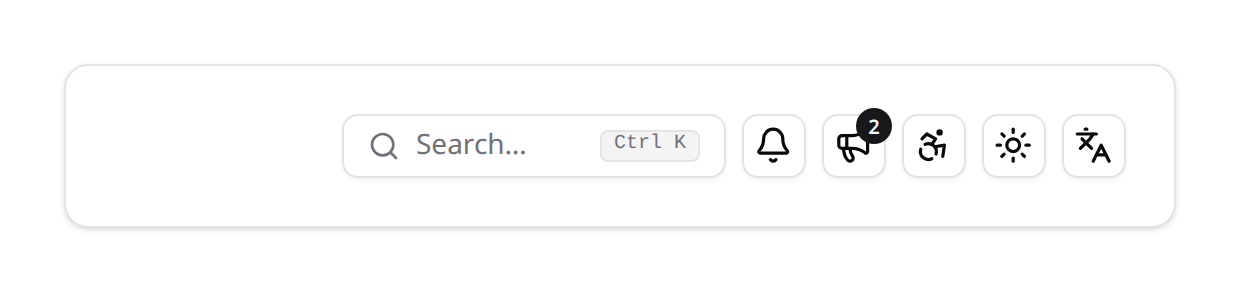
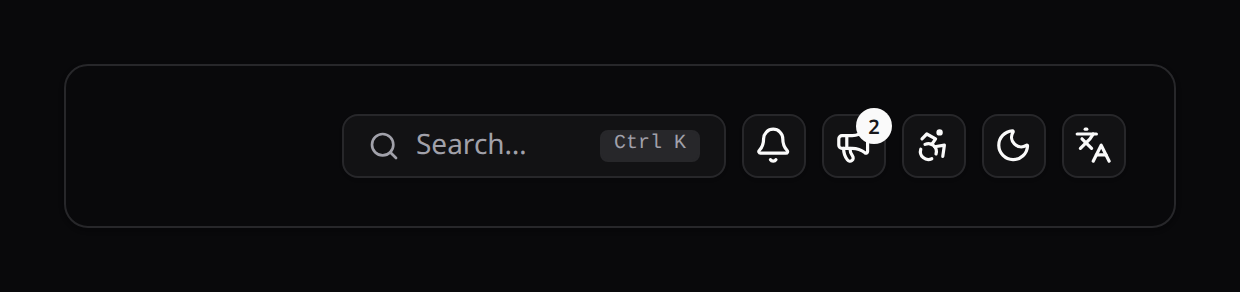
<div class="flex items-center gap-2">
    <KinetixSpotlightTrigger />
    <KinetixNotificationTrigger />
    <KinetixAnnouncements />
    <KinetixAccessibilityMenu />
    <KinetixModeToggle />
    <KinetixLanguageSwitcher />
</div>
Below the sm breakpoint the spotlight trigger collapses from its search box to the same icon button as the rest, so the strip stays one row on a phone:


Register the Vue plugins (directives)
The publish also ships three plugins under resources/js/plugins/. Register the ones you use in resources/js/app.ts — without this, v-can / v-kinetix-hotkey are unknown directives and the accessibility preferences never apply:
import KinetixAccessibility from '@/plugins/kinetixAccessibility';
import KinetixHotkeys from '@/plugins/kinetixHotkeys';
import KinetixPermissions from '@/plugins/kinetixPermissions';

createInertiaApp({
  // ...
  setup({ el, App, props, plugin }) {
    createApp({ render: () => h(App, props) })
      .use(plugin)
      .use(KinetixAccessibility) // a11y prefs applied before mount (no flash)
      .use(KinetixHotkeys)       // v-kinetix-hotkey + shortcut registry
      .use(KinetixPermissions)   // v-can directive + $can
      .mount(el);
  },
});
See Accessibility, Keyboard shortcuts and Permissions for what each plugin provides.
6. Build
npm run build # or: npm run devIf you ever see "Unable to locate file in Vite manifest", run the build again.
Theming
Kinetix styles everything with shadcn's semantic design tokens (bg-background, text-foreground, bg-primary, border-input, …) and builds interactive widgets on Reka UI — the headless library shadcn-vue itself wraps. It does not import your @/components/ui/* files, so it can't break your build; it reuses the same token contract instead.
In a shadcn-vue starter kit the CSS variables already exist. Otherwise publish the fallback tokens (--tag=kinetix-styles) and import resources/css/kinetix.css.
Status tokens (success · warning · info)
shadcn ships destructive but no success/warning/info colors, so Kinetix adds three themeable tokens used by badges, stat chips, alerts, modals, notifications and action colors. If your app defines its own tokens but not these three, add them, and map them in @theme so Tailwind generates the *-success / *-warning / *-info utilities. kinetix:install appends this block to resources/css/app.css when it maps none of them, and kinetix:doctor warns when they are missing — without them those surfaces render colorless and nothing errors:
:root {
  --success: 142 72% 27%;  --success-foreground: 0 0% 100%;
  --warning: 26 90% 33%;   --warning-foreground: 0 0% 100%;
  --info:    201 96% 32%;  --info-foreground: 0 0% 100%;
}
.dark {
  --success: 142 69% 58%;  --success-foreground: 142 80% 10%;
  --warning: 43 96% 56%;   --warning-foreground: 26 83% 14%;
  --info:    198 93% 60%;  --info-foreground: 204 80% 16%;
}

@theme inline {
  --color-success: hsl(var(--success));
  --color-success-foreground: hsl(var(--success-foreground));
  --color-warning: hsl(var(--warning));
  --color-warning-foreground: hsl(var(--warning-foreground));
  --color-info: hsl(var(--info));
  --color-info-foreground: hsl(var(--info-foreground));
}
danger maps to the built-in destructive token.
Each status is used three ways, and the values above read at 4.5:1 or better in both themes for all three: as text on the page, as text on its own 10% tint (badges), and as a solid fill under its -foreground (buttons, solid alerts). If you re-skin them, check those three pairings in light and dark. White text on destructive follows shadcn's recipe (text-white with dark:bg-destructive/60), so it reads whatever red your theme defines.
Z-index scale
Everything Kinetix teleports to <body> sits on a three-layer CSS-variable scale, so overlays and the popovers opened from inside them stack correctly (a date picker inside a KinetixSheet must beat the sheet):
| Variable | Default | Layer |
|---|---|---|
--kinetix-z-overlay | 100 | Full-screen backdrops (dialog/sheet/drawer dimmers) |
--kinetix-z-modal | 100 | Dialog, sheet, drawer and lightbox content |
--kinetix-z-popover | 120 | Popper content: selects, comboboxes, date/time pickers, dropdowns, tooltips |
The defaults are inlined as fallbacks (z-[var(--kinetix-z-popover,120)]), so nothing works differently if you never define the variables. Define them on :root only to re-stack Kinetix around your app's own layers — e.g. push the whole suite above a legacy z-index: 500 header:
:root {
  --kinetix-z-overlay: 600;
  --kinetix-z-modal: 600;
  --kinetix-z-popover: 620;
}
Keep popover > modal ≥ overlay — popovers open from inside modals and must clear them. (Reka UI copies the popper content's computed z-index onto its positioning wrapper, so the variables resolve correctly there too; you never need !important against Kinetix's own layers.)
Configuration
After publishing, edit config/kinetix.php. The most relevant keys:
return [
    'notifications' => [
        'database' => env('KINETIX_DATABASE_NOTIFICATIONS', false), // persist in DB
        'limit'    => env('KINETIX_NOTIFICATIONS_LIMIT', 15),
        'sound'    => [
            'enabled' => env('KINETIX_NOTIFICATIONS_SOUND', true),
            'path'    => env('KINETIX_NOTIFICATIONS_SOUND_PATH', '/vendor/kinetix/notification.wav'),
        ],
        'broadcast' => env('KINETIX_NOTIFICATIONS_BROADCAST', false), // real-time
    ],

    // Real-time WebSocket config (Laravel Echo). See the Notifications guide.
    'broadcasting' => [ /* 'echo' => [ ... ] */ ],

    // Public disk for uploads & image columns. Generated artifacts (exports,
    // imports, report runs, GDPR dumps) use `private_disk` instead.
    'filesystem' => ['disk' => env('KINETIX_FILESYSTEM_DISK', 'public')],

    // Scope internal routes/queries to the current team (e.g. {team}/_kinetix).
    'teams' => env('KINETIX_TEAMS_ENABLED', false),

    'route_prefix' => env('KINETIX_ROUTE_PREFIX', '_kinetix'),
    'middleware'   => ['web', 'auth'],
];| Variable | Default | Description |
|---|---|---|
KINETIX_DATABASE_NOTIFICATIONS | false | Persist notifications to the database |
KINETIX_NOTIFICATIONS_BROADCAST | false | Broadcast notifications in real time |
KINETIX_FILESYSTEM_DISK | public | Disk for uploads / exports / imports / images |
KINETIX_TEAMS_ENABLED | false | Scope routes/queries to the current team |
KINETIX_ROUTE_PREFIX | _kinetix | Prefix for internal API routes |
Team scoping: one switch, per-module overrides
kinetix.teams is the single switch for team scoping — besides prefixing Kinetix's internal routes with {current_team}/, it is the default for every module's own teams flag (permissions, membership, settings, webhooks, onboarding, wizards, features, activity, billing). Each module flag is tri-state:
null(the default) — inheritkinetix.teams;true/false— explicit override for that module.
'teams' => true,                       // everything team-scoped…
'billing' => ['teams' => false],       // …except billing (personal subscriptions)
Flipping a module's scope on a live app changes which rows its queries see (
team_idfilters) — plan a data migration if you change it after launch.
The {current_team} segment: route keys & membership
With teams on, Kinetix's routes gain a leading {current_team} parameter. The segment carries the team's route key (Team::getRouteKeyName() — often a slug or uuid, not the id). Kinetix resolves it via KinetixTeams::currentTeamKey():
- a bound model (if your app registered a binding) → its primary key;
- a scalar segment → looked up through the authenticated user's teams relation (
kinetix.team_switcher.teams_relation, defaultteams) by the route key name. This doubles as the membership check: a segment that is not one of the user's teams responds404; - if the user model has no teams relation, the raw segment is trusted as the key (id-routed teams) and membership enforcement is your responsibility (e.g. a middleware on your side).
Team-aware links in Vue — useKinetixTeams().teamUrl()
The {current_team} segment carries the team's route key — getRouteKey(), which is a slug or uuid when the model defines one, and not the numeric id. So never build a link by interpolating a team id. Kinetix resolves the active team server-side and exposes it through the composable:
<script setup lang="ts">
import { Link } from '@inertiajs/vue3';
import { useKinetixTeams } from '@/composables/useKinetixTeams';

const { teamUrl, currentTeamKey } = useKinetixTeams();
</script>

<template>
  <Link :href="teamUrl('/projects')">Projects</Link>   <!-- /acme/projects -->
  <Link :href="teamUrl('/settings')">Settings</Link>
</template>- Teams off →
teamUrl('/projects')returns/projects, so the same template works in a single-tenant app. - Idempotent → a path that already carries the segment is returned unchanged, so a server-generated URL can be passed through it safely.
currentTeamKeyis the raw segment when you need it (arouter.visit, anhrefbuilt elsewhere).
The same composable exposes the switcher (teams, current, switchTeam, createUrl), which additionally needs kinetix.team_switcher.enabled. Linking works from kinetix.teams alone.
Kinetix's own endpoints need no help
Published components build their URLs from kinetix_config.route_prefix, which already includes the resolved segment. teamUrl() is for your pages.
Which modules scope data per team
Team scoping has two independent layers: the route (every module is mounted under {current_team} when kinetix.teams is on) and the data. They are not the same thing — a team-prefixed URL does not by itself isolate rows:
| Data scope | Modules |
|---|---|
Per team (team_id column, filtered on read and stamped on write) | Permissions (roles), Membership, Settings, Activity, Webhooks (+ their logs, through the endpoint), Saved Views, Tags, PDF Templates, Onboarding, Wizards, Reports Center, API request logs |
Hybrid — a team's own rows plus platform-wide ones (team_id NULL) | Mail Templates (a global default a team may override), Announcements (a global entry every feed shows) |
| Per user (team-independent by nature) | Tours state, Accessibility, Notification preferences, Connected accounts, Sessions |
| Inherited from the record they hang off | Comments (via the commentable) |
| Global — one shared pool across every tenant, by design | Billing plans (a catalog), Confidential keys |
The last row matters: those routes are team-prefixed, which reads like isolation, but the rows are shared — deliberately, since both are platform-level catalogs. Gate their management behind a platform role, not a per-team one. php artisan kinetix:doctor states which ones you have enabled, and errors when a team-scoped module's table is still missing its team_id column (published the package, forgot the migration).
Hybrid vs per-team is a deliberate distinction. Mail templates and announcements use NULL as a shared default every tenant can see. Logs and records never do: for Reports Center and API logs a NULL row is unattributed, and the scope fails closed rather than showing it to everyone.
Every team-scoped module resolves the tenant through the same helper — KinetixTeams::keyFor('module') — which reads the {current_team} segment (falling back to the user's currentTeam outside a request) and 404s on a team the user doesn't belong to. Use it in your own code rather than $user->currentTeam, which ignores the URL and therefore the team the page is actually serving. A model with a team_id column can use ScopedToTeam and get ->forCurrentTeam() plus ::currentTeamId() for free; the scope fails closed (an unresolvable team matches NULL rows, never all of them).
Exports and queued work carry no team context
{prefix}/exports/* is the one pair of endpoints not under the team segment, on purpose: the download URL is generated inside the queued job, where there is no request to resolve a segment from. The same applies to any exporter or report you write — the query runs in a job, so KinetixTeams::keyFor() there resolves nothing. Capture the tenant at dispatch time and pass it in the job's parameters:
PostExporter::make()->withParameters([
    'team_id' => \Happones\Kinetix\Support\KinetixTeams::keyFor('exports'),
])->export($user);
The endpoint contract — kinetix:routes
Every module registers its own endpoints under {current_team}/{route_prefix}/… and the published components call them directly. This is the single most common integration mistake: writing a controller of your own on a different path and waiting for a Kinetix component to hit it. Your app registers the Inertia page route; the data flows through the built-in endpoints.
php artisan kinetix:routes              # every Kinetix endpoint: method, resolved URI, name, middleware
php artisan kinetix:routes members      # filter by URI/name
php artisan kinetix:routes --json       # machine-readable
It also surfaces collisions: a route of yours that happens to live under the same prefix shows up in the list.
UUID / ULID primary keys on your models
Kinetix's own tables use auto-increment bigint primary keys — that part works the same whatever your app does. The columns that reference your models (user_id, team_id, the causer/subject morphs on activity, the commentable/taggable morphs, invited_by, created_by_id, launched_by_id) are built by Happones\Kinetix\Support\HostKeys, which types them after your models at migrate time:
HostKeys::user($table)->index();   // uuid / ulid / string / bigint — detected
HostKeys::team($table)->nullable();
Detection (kinetix.key_types.user / .team = 'auto', the default) looks at the primary key of the configured auth user model (and of the user's teams relation for the team model): a HasUlids key → ulid, a HasUuids key → uuid, a string $keyType → string, anything else → bigint. A model that uses HasUlids/HasUuids only for a secondary column (uniqueIds() returning ['ulid'], a public id next to an auto-increment key) keeps bigint. Mixed apps just work — each column follows the model it points to.
Two cases still need a decision from you:
- Morph targets (
commentable_id,taggable_id,subject_id,causer_id) can point at any model, so they can't be detected. They followkinetix.key_types.morph(KINETIX_MORPH_KEY_TYPE), defaultbigint— set it touuid/ulidwhen the models you comment/tag/audit use those keys. - Detection can't see your setup? Pin the type explicitly:
KINETIX_USER_KEY_TYPE=uuid,KINETIX_TEAM_KEY_TYPE=ulid— a pinned value always beats detection.
No foreign-key rewiring is needed — Kinetix stores these as plain indexed columns without DB-level constraints. The one exception is kinetix-permission-team-migrations, which adds real FKs to spatie/laravel-permission's pivot tables — there, follow spatie's own UUID guidance for those tables first.
Already migrated on an older Kinetix? Tables created before this behaviour shipped have unsignedBigInteger columns on disk; write an ALTER migration of your own — converting existing integer data to UUIDs is not automatic.
Text columns holding numbers (installs before 0.219.15). Detection used to read a model's traits, so a User or Team that uses HasUlids only for a public ulid next to its auto-increment id got char(26) user_id / team_id columns holding numbers. php artisan kinetix:doctor lists any such column, and
php artisan kinetix:fix-key-columns            # writes the migration
php artisan kinetix:fix-key-columns --dry-run  # only lists the columns
php artisan migrate
writes a migration (it does not run it) converting them to unsignedBigInteger, with PostgreSQL's USING cast where it's needed. A column holding anything but numbers — a real ULID — is listed and left alone.
Affected migrations by feature
Publish tags follow kinetix-<feature>-migrations. Columns referencing YOUR models per feature (all typed by HostKeys — morphs marked need kinetix.key_types.morph set for non-bigint targets):
| Feature (tag) | Columns to retype |
|---|---|
membership | user_id, team_id, invited_by |
settings | team_id |
activity | causer_id, subject_id (morphs), team_id |
webhooks | team_id |
onboarding | user_id, team_id |
wizards | user_id, team_id |
accessibility | user_id |
connected-accounts | user_id |
comments | user_id, commentable_id (morph) |
tags | taggable_id (morph), team_id |
notification-preferences | user_id |
saved-views | user_id, team_id |
announcements | user_id, team_id |
api-logs | user_id, team_id |
pdf | team_id |
reports-center | created_by_id, launched_by_id, team_id |
tours | user_id |
mail-templates | team_id |
billing | billable_id (morph) on kinetix_usage / kinetix_credits |
permission-team | spatie pivots — see spatie's UUID guide |
Columns like tag_id, webhook_endpoint_id or parent_id point at Kinetix's own bigint tables and must stay unsignedBigInteger.
Diagnostics — kinetix:doctor
Most Kinetix misconfigurations fail silently: team scoping half-enabled, an attach_member that was never set, roles seeded without team context, two i18n bundles where Vite compiles the stale one, published files carrying local edits that the next composer install discards. One command reports all of them:
php artisan kinetix:doctor          # exits 1 when there is at least one error
php artisan kinetix:doctor --json   # machine-readable, full lists
Kinetix doctor
✓ Routing endpoints mounted under {current_team}/_kinetix/…
✓ Modules permissions, membership, settings
✗ Permissions kinetix team scoping is on but permission.teams is false
! Roles 3 teamless (global) role(s)
admin
editor
viewer
✗ Membership team scoping is on but attach_member is null
! i18n two bundles present — one of them is never refreshed
! Publishes 3 published file(s) have local edits
2 error(s), 4 warning(s).It also checks that resources/css/app.css maps the status tokens, and finds middleware appended to a group (web), as the docs advise, not only on a route.
Because it exits non-zero on errors it works as a deploy gate (php artisan kinetix:doctor && php artisan migrate --force). Warnings never fail the command.
Two Vue i18n bundles
vue-i18n:generate defaults to --format=ts while the generator's published config points jsFile at a .js path, so both files can end up in resources/js/. Vite resolves .js before .ts, which means the bundle that actually compiles is the one nothing refreshes — new translation keys land in the .ts and never reach the UI. Delete the stale file and mirror your flags in kinetix.translations.vue_i18n_options; kinetix:doctor and kinetix:upgrade both flag the situation.
Published files are vendor-managed
kinetix:upgrade re-publishes with --force, so an edit inside resources/js/components/kinetix/… disappears on the next composer install. It now names the files whose local edits it overwrote instead of discarding them quietly:
3 published file(s) had local edits and were overwritten:
  ~ resources/js/components/kinetix/KinetixMemberList.vue
  ~ resources/js/composables/useKinetixBilling.ts
To keep a change, move it into a wrapper component, a slot, or config.
TypeScript declarations live in types/kinetix.ts (v0.119.0)
Kinetix publishes its declarations to resources/js/types/kinetix.ts:
import type { KinetixTableData } from '@/types/kinetix';Earlier versions published resources/js/types/index.ts — which in the Laravel starter kits is your barrel (export * from './auth', './teams', …). Overwriting it stripped those re-exports, and because @/types still resolved, TypeScript degraded to any instead of erroring: whole component prop contracts silently stopped being checked.
Upgrading: restore your own barrel in types/index.ts and point Kinetix imports at @/types/kinetix (kinetix:upgrade prints this reminder while a Kinetix-authored index.ts is still present).
Next steps
- Resources — scaffold a full CRUD with one command.
- Tables · Forms · Infolists · Actions
- Import & Export · Relation Managers
- Notifications · Widgets · Billing