

Spotlight Command Palette
Kinetix Spotlight is a global Cmd/Ctrl+K palette that searches across your models, navigation and quick actions. Model searches use laravel/scout when the model is Searchable, otherwise a capped LIKE query. Results are authorization-aware — sources self-gate and per-record policies are honored, so the palette never surfaces a record the user can't see.
Configuration
'spotlight' => [
    'enabled' => env('KINETIX_SPOTLIGHT_ENABLED', false),
    // auto = Scout for Searchable models, else 'database' (LIKE). Force with 'database'.
    'driver'  => env('KINETIX_SPOTLIGHT_DRIVER', 'auto'),
    // Max results per source. A source may override it with ->limit().
    'limit'   => env('KINETIX_SPOTLIGHT_LIMIT', 5),
    // Shortest query that reaches the database. One character matches nearly
    // every row of every source, and it is the first thing every user types.
    'min_chars' => env('KINETIX_SPOTLIGHT_MIN_CHARS', 2),
    // Rate limit for the search endpoint ('requests,minutes'); null removes it.
    'throttle'  => env('KINETIX_SPOTLIGHT_THROTTLE', '60,1'),
],
min_chars is enforced on the endpoint and in the palette (which reads it from the shared config, so the two never disagree) — below it, the palette shows a "keep typing" hint instead of firing a request. Cheap in-memory sources (SpotlightLink) still answer short and empty queries; only the model sources wait.
throttle matters because one request fans out to every authorized source: without it a held-down key is an unbounded multiplier on database load, from any authenticated user. The limit has its own counter, so it doesn't share one with your app's throttle routes. A third segment (60,1,my-prefix) names that counter yourself.
1. Registering sources
Register sources in a service provider. There are two kinds:
use Happones\Kinetix\Spotlight\KinetixSpotlight;
use Happones\Kinetix\Spotlight\SpotlightLink;
use Happones\Kinetix\Spotlight\SpotlightResource;

KinetixSpotlight::register([
    // Searchable model
    SpotlightResource::make(\App\Models\Post::class)
        ->titleAttribute('title')
        ->subtitle('status')
        ->searchColumns(['title', 'body'])      // used by the LIKE fallback
        ->url(fn ($post) => route('posts.edit', $post))
        ->icon('file-text')
        ->authorize('posts.viewAny')             // source-level ability (optional)
        ->limit(5),

    // Navigation link / quick action
    SpotlightLink::make('Billing')
        ->url('/billing')
        ->icon('credit-card')
        ->keywords(['invoice', 'subscription']),

    SpotlightLink::make('Create post')
        ->event('open-create-post')              // dispatched on the client instead of navigating
        ->icon('plus'),
]);
Auto-discovering source classes
For sources you'd rather keep as dedicated classes, put any SpotlightSource implementation in app/Kinetix/Spotlight and it is discovered automatically (additive to register()). Discovered classes are resolved from the container, so they may declare constructor dependencies. Configure or disable it in config/kinetix.php:
'spotlight' => [
    // Set to null to disable discovery.
    'discover_path'      => app_path('Kinetix/Spotlight'),
    'discover_namespace' => 'App\\Kinetix\\Spotlight',
],
You can also point discovery at another directory from a service provider:
use Happones\Kinetix\Spotlight\KinetixSpotlight;

KinetixSpotlight::discover(in: app_path('Domain/Spotlight'), for: 'App\\Domain\\Spotlight');
2. Authorization (the important part)
Two layers, both enforced server-side:
Source-level —
->authorize($ability)hides an entire source unless theGateallows it (e.g. only admins see the "Users" source).Per-record — when a model has a policy, each result is filtered through its
viewpolicy. To pre-filter efficiently (and add team scoping), pass a base query:phpSpotlightResource::make(Post::class) ->query(fn () => Post::where('team_id', auth()->user()->currentTeam->id)) ->searchColumns(['title']);
->query() is the tenancy seam, and it scopes both drivers. Under Scout the engine only proposes candidates; they are hydrated through this query, so a row it excludes can never reach the palette — a model adopting Searchable for an unrelated reason cannot silently widen what the palette can see. Read Scout & multi-tenancy before indexing a tenant-scoped model.
Empty queries never dump the database — resources return nothing until there's a search term of at least min_chars; only links/actions show.
Skipping the per-record pass
The view policy runs once per candidate row, and a policy that checks tenancy usually costs a query of its own — so a source whose query() has already answered the question pays for the answer twice. Say so:
SpotlightResource::make(Post::class)
    ->query(fn () => PostResource::getEloquentQuery())  // already scoped
    ->trustQuery();                                     // …so skip the policy pass
Without it, Kinetix walks pages of candidates until the limit is filled or the result set runs out (up to five pages). That is deliberate: a fixed over-fetch has to guess a rejection rate, and guessing low returns fewer results than the limit while matching, visible records go unshown.
Group order
Groups are ordered by source priority, highest first; equal priorities keep registration order, so the palette doesn't reshuffle between deploys.
SpotlightLink::make('Billing')->url('/billing')->priority(10); // pinned to the top3. The palette
Mount <KinetixSpotlight> once in your authenticated layout — it owns the Cmd/Ctrl+K shortcut and the dialog:
<script setup lang="ts">
import KinetixSpotlight from '@/components/kinetix/KinetixSpotlight.vue'
</script>

<template>
  <KinetixSpotlight />
  <slot />
</template>
Built on Reka UI's Dialog + Combobox (focus trap, keyboard navigation and selection for free). Selecting a result navigates to its url, or — for an action — dispatches a window CustomEvent named by its event (listen for it to open a modal, etc.). The search is debounced; use useKinetixSpotlight() for a custom UI.
Header trigger
Not everyone knows the shortcut — add a visible launcher in your header (next to the notification bell). <KinetixSpotlightTrigger> opens the same palette and shows the ⌘K / Ctrl K hint (it collapses to an icon button on small screens):
<template>
  <header class="flex items-center gap-2">
    <KinetixSpotlightTrigger />
    <KinetixNotificationTrigger />
  </header>

  <!-- mounted once, anywhere in the layout -->
  <KinetixSpotlight />
</template>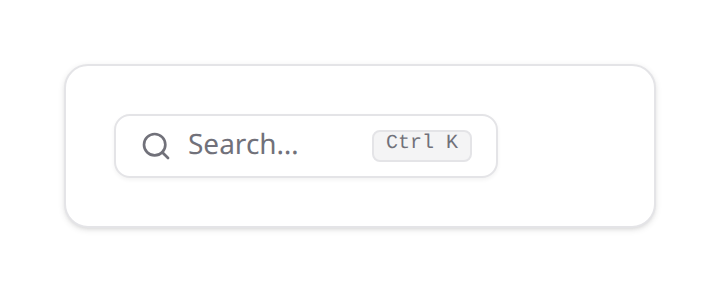
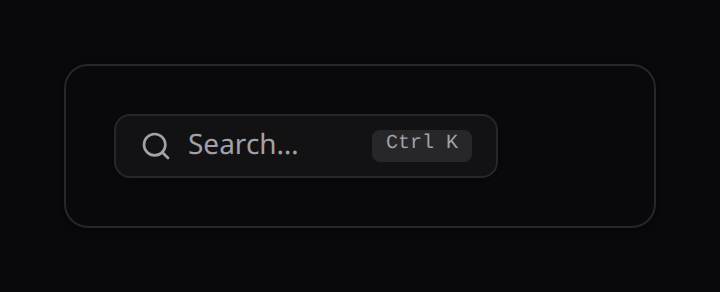
It dispatches a window kinetix:spotlight event that <KinetixSpotlight> listens for, so the two stay decoupled (the Cmd/Ctrl+K shortcut keeps working independently).
4. Driver
auto (default) routes a Searchable model's search through Scout (using your configured engine), and falls back to a LIKE query over searchColumns for non-Scout models. Force the LIKE path with driver = 'database'.
Scout & multi-tenancy
->query() scopes the Scout path too — the engine proposes candidates, your query decides which of them may be hydrated. That closes the hole, but it closes it after the engine has already spent its buffer, so if the index holds every tenant's rows the reader sees fewer results than the limit (sometimes none) even though matches exist.
Filter engine-side as well, so the buffer is spent on rows that survive:
SpotlightResource::make(Post::class)
    ->scoutWhere(['team_id' => auth()->user()->currentTeam->id])  // the engine filters
    ->query(fn () => Post::where('team_id', auth()->user()->currentTeam->id)); // and so does SQL
scoutWhere() maps to Scout's where(), so the attribute must be in the model's toSearchableArray() and filterable in your engine. It is a no-op on the database driver, where query() already filters in SQL.
Both, not either.
scoutWhere()alone trusts the index to be correct and current;query()alone is correct but under-fills. Together you get full result sets that cannot cross a tenant boundary even if the index is stale.
Scaling profile of the LIKE driver
KinetixQuery::search() builds %term%. The leading wildcard means no index applies — inherent to substring search, not a defect. The useful nuance:
- When the source query filters on an indexed tenant column first, the scan is confined to that tenant's slice. Cost tracks your largest single tenant, not the platform's total row count — a very different planning signal from "it degrades as you add customers".
- Dotted relation columns (
author.name) resolve throughwhereHas, adding a dependent subquery per column. Prefer denormalized columns on hot sources. - A source blocked by
->authorize()or by a feature gate costs nothing: it never runs.
Move to Scout when the largest tenant's slice — not the table — stops fitting a scan, and set up scoutWhere() at the same time.
| Method | Endpoint | Description |
|---|---|---|
GET | {prefix}/spotlight?q=… | Grouped, authorization-filtered results (throttled) |