

Mail Templates
Editable email templates — a subject + Markdown or HTML body with {{ variable }} placeholders — managed from a UI and stored in the database. Your application supplies the variable values and triggers the sends; Kinetix handles storage, rendering and a test-send. Non-developers can edit the copy without touching code.
Installation
php artisan vendor:publish --tag=kinetix-mail-templates-migrations
php artisan migrate'mail_templates' => ['enabled' => env('KINETIX_MAIL_TEMPLATES_ENABLED', true)],The manager and test endpoints are gated by the viewKinetixMail ability (defaults to allow in local — define your own for production):
Gate::define('viewKinetixMail', fn ($user) => $user->isAdmin());Multi-tenant: global defaults with per-team overrides
With kinetix.teams on (or mail_templates.teams set explicitly), templates follow the same hybrid shape as roles:
team_id | Meaning |
|---|---|
NULL | A global default — every tenant resolves it unless they override it |
| set | That team's own template; invisible to every other team |
Uniqueness is (team_id, key), so a team's override reuses the global key on purpose. KinetixMail prefers the override:
KinetixMail::send($user->email, 'welcome', [...]); // team's override, else the global defaultEditing a global template from inside a team forks it rather than rewriting the platform default for every tenant (copy-on-write): the response comes back 201 with forked: true and the team now owns its copy. Deleting that copy reverts the team to the default; deleting the default itself is refused inside a team scope (403) — do it as a platform admin, outside a team.
A team that disables its override has turned that mail off for itself; it does not silently fall back to the global one.
Queued mail has no team context
KinetixMail::send() inside a job resolves the global template, because there is no request to read the team from. Name the tenant when a job or a console command must send a specific team's override:
KinetixMail::sendFor($order->team_id, $customer->email, 'receipt', [...]);Upgrading an existing install
php artisan vendor:publish --tag=kinetix-mail-templates-migrations --force
php artisan migrate
The migration is additive and idempotent: existing rows keep team_id NULL, so they become the global defaults and stay visible everywhere — nothing disappears from the UI. Until you run it, single-tenant apps are unaffected (Kinetix omits the column when the module isn't team-scoped) and kinetix:doctor reports the missing column for team-scoped ones.
The manager
<script setup lang="ts">
import KinetixMailTemplates from '@/components/kinetix/KinetixMailTemplates.vue';
</script>

<template>
    <KinetixMailTemplates />
</template>
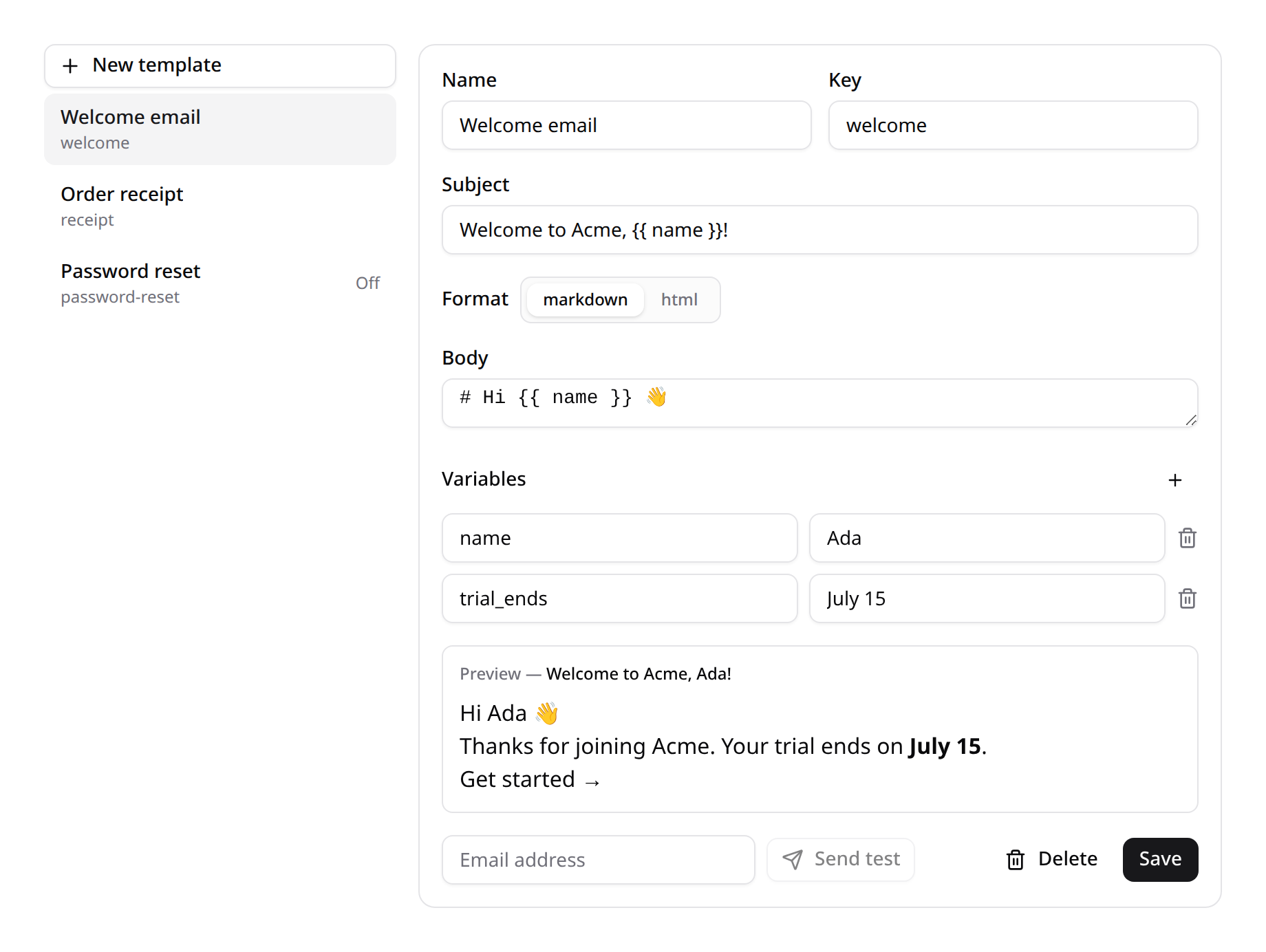
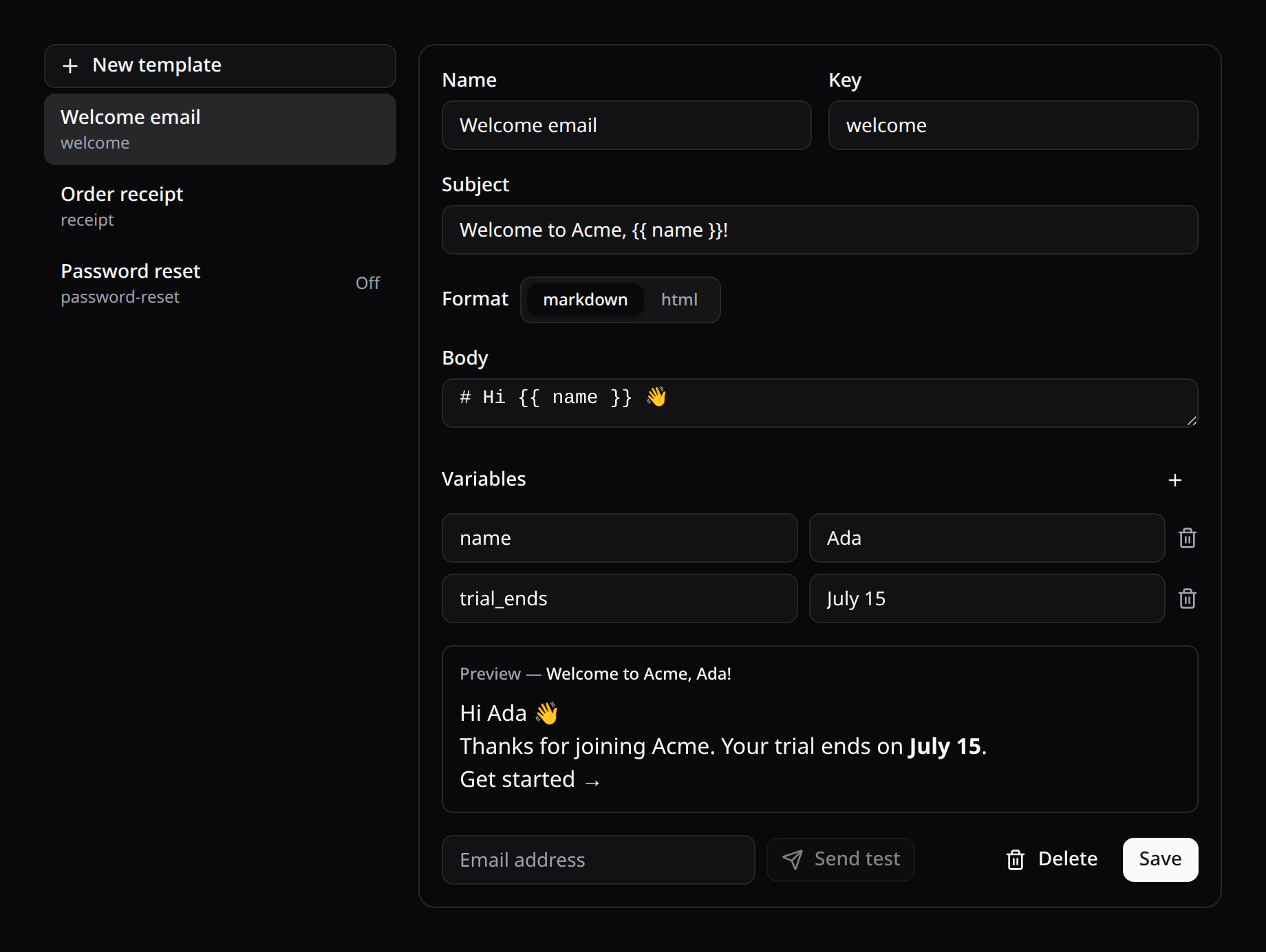
Pick a template (or New template), edit its name/key/subject, choose Markdown or HTML, write the body with {{ variable }} placeholders, declare the variables (with sample values), and watch the live preview render with the samples. Send test delivers it to any address. Strings are localized (mail_*, en/es/fr/pt).
Sending from your app
The actual sends live in your app's logic — call KinetixMail::send() with the template key and the data:
use Happones\Kinetix\Mail\KinetixMail;

KinetixMail::send($user->email, 'welcome', [
    'name'       => $user->name,
    'trial_ends' => $user->trial_ends_at->toFormattedDateString(),
]);
KinetixMail::send($to, string $key, array $data = []): bool— renders and mails the template (returnsfalseif it's missing or disabled, so you can fall back).KinetixMail::render(string $key, array $data = []): array|null—{ subject, html }without sending.KinetixMail::sendFor($team, $to, string $key, array $data = []): bool— the same assend()for a named team (a model or key;nullfor the global default), whatever team the request serves.KinetixMail::mailableFor($team, string $key, array $data = []): TemplatedMail|null— the rendered template as a Mailable, without sending. A notification'stoMail()can return it, so the mail keeps honoring the user's channel preferences while its text stays editable:phppublic function toMail(object $notifiable): Mailable|MailMessage { // Null when the template is missing or the team turned it off. return KinetixMail::mailableFor($this->team, 'low-stock-digest', [...]) ?->to($notifiable->email) ?? (new MailMessage)->line('...'); }KinetixMail::test(string $key, string $to, array $data = []): bool— sends a[TEST]email using the template's sample data.
Variable values are HTML-escaped in Markdown templates; HTML templates are rendered as-is (you control the markup). The subject is always plain text.
The email goes out inside your app's markdown mail layout (<x-mail::message>), so it carries the same header, footer and theme as the rest of your mail — publish and brand them with php artisan vendor:publish --tag=laravel-mail. Set kinetix.mail.layout (KINETIX_MAIL_LAYOUT) to false to send the bare HTML instead. KinetixMail::render() always returns the bare body.
Endpoints
Registered under your Kinetix prefix ({current_team}/_kinetix/mail-templates with teams on), all gated by viewKinetixMail. Another team's template is a 404:
| Method | Route | Purpose |
|---|---|---|
GET | {prefix}/mail-templates | List |
POST | {prefix}/mail-templates | Create |
PUT | {prefix}/mail-templates/{id} | Update |
DELETE | {prefix}/mail-templates/{id} | Delete |
POST | {prefix}/mail-templates/preview | Render unsaved content (live preview) |
POST | {prefix}/mail-templates/{id}/test | Send a test |