

Help Center
An in-app user manual rendered from markdown files your app owns: articles become searchable, permission-aware help pages with auto-generated screenshots. The pipeline was designed for a "document every module" workflow — write one .md per module, capture the screenshots with one artisan command, and users only ever see the articles (and article sections) their permissions allow.
Required dependency (host app): Playwright. Screenshot capture drives a real Chromium against your running app. Install it once in the host project:
bashnpm i -D playwright npx playwright install chromiumThe Help Center pages themselves work without Playwright — it is only needed to (re)generate screenshots.
1. Setup
Enable the module and scaffold the pages:
# .env
KINETIX_HELP_ENABLED=truephp artisan kinetix:make-help-pageThe scaffold writes resources/js/pages/Kinetix/Help/{Index,Show}.vue (thin mounts of <KinetixHelpCenter> / <KinetixHelpArticle>), seeds a sample article in resources/help/ when the directory is empty, and prints the routes to register:
Route::get('help', fn () => inertia('Kinetix/Help/Index'))->name('help.index');
Route::get('help/{article}', fn (...$params) => inertia('Kinetix/Help/Show', ['slug' => end($params)]))->name('help.show');

// Teams on? Nest both under the {current_team} segment like your other routes.
// The Show closure receives {current_team} first — end($params) is the article.
Data flows through Kinetix's own team-aware endpoints ({prefix}/help, /help/article/{slug}, /help/search, /help/screenshots/{file}) — the pages carry no controller code.
2. Writing articles
One markdown file per article in resources/help/ (configurable via kinetix.help.path). The slug is the filename minus .md; an NN- prefix orders naturally.
---
title: Products
group: Catalog
icon: package
order: 6
permission: products.view
---
# Products
Create, edit and organize your products.

## Creating a product
…Front matter is flat key: value pairs only (no nested YAML — no extra dependency needed). All keys are optional:
| Key | Effect |
|---|---|
title | Card/list title. Falls back to the first # heading, then the slug. |
group | Groups articles into sections on the index. |
icon | Lucide icon name for the card. |
order | Explicit ordering (wins over the filename sort). |
permission | Hides the article server-side from users the Gate denies. |
Files named README.md or starting with _ are ignored (drafts).
The body is Kinetix markdown: callouts (> [!TIP]), code blocks with a copy button — highlighted when phiki/phiki is installed — tabbed code groups and scrollable tables all work in an article.
Translations
Add a locale variant next to the base file: 06-products.es.md, 06-products.pt.md. The base .md must exist — variants alone are not discovered.
Resolution. A request is served in the active language, falling back one step at a time: {slug}.pt_BR.md → {slug}.pt.md → {slug}.{help.fallback_locale}.md → the base {slug}.md. Titles, excerpts, groups, ordering and search all read the resolved file, so an index is never a mix of half-translated metadata.
The language is part of the request, not an ambient assumption. Every help endpoint takes ?locale= (validated against the locales the manual is authored in — anything else is ignored), and the components send the app's active language with every call. Three things follow:
- Switching language in your app's selector re-fetches the index and the open article immediately — no page reload, no article left in the previous language.
- Responses carry
Content-Language+Vary, and the URL differs per language, so no browser or CDN cache can hand one language's payload to another. - A reader can open a single article in another language without changing the whole app's locale (the chips described in §4).
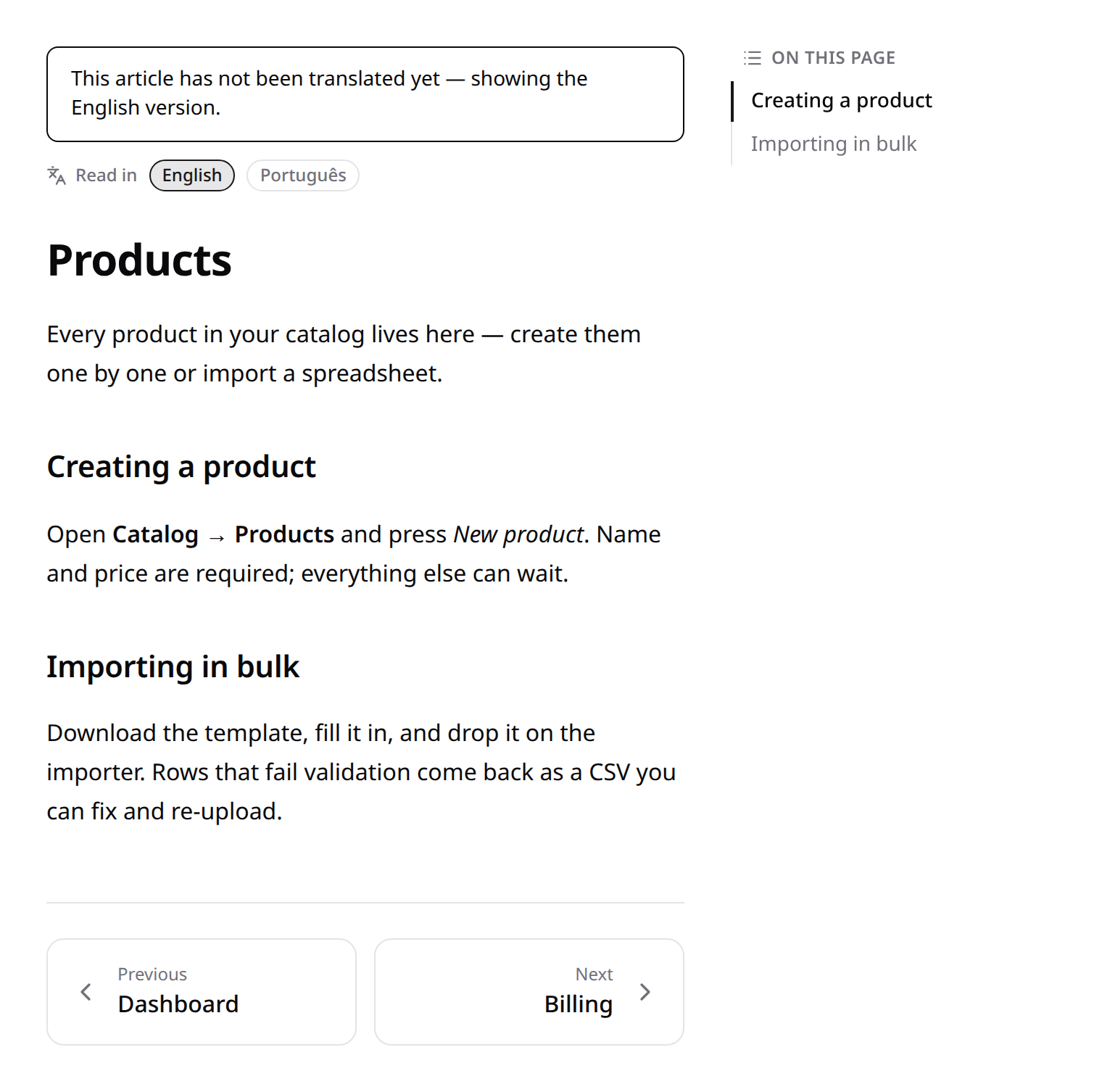
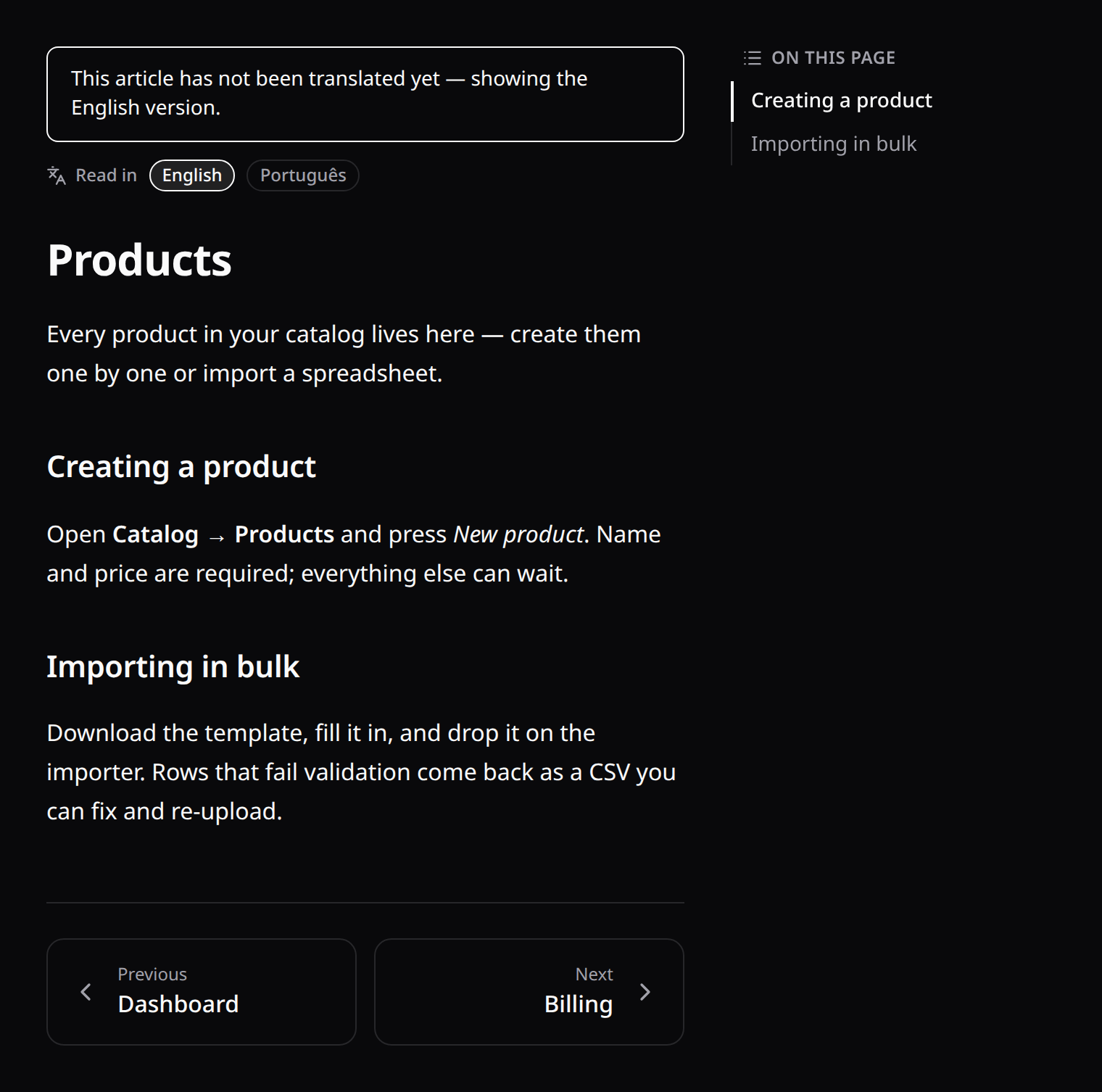
Untranslated articles are marked, never silently swapped. Each payload says which language it is actually in (locale) and whether that differs from the one asked for (isFallback). The components use it to mark the entry with its real language — both visually and as a lang attribute, so screen readers switch pronunciation instead of reading English as if it were Spanish. Prefer hiding those articles entirely? Set help.hide_untranslated and they disappear from the index, search and their own URL (404) until translated.
Coverage and scaffolding.
php artisan kinetix:help-status                    # matrix: article × locale
php artisan kinetix:help-status --strict           # non-zero exit on any gap (CI gate)

php artisan kinetix:make-help-page --locale=es --from=06-products
php artisan kinetix:make-help-page --locale=es     # every article missing that locale
The scaffolder copies the front matter verbatim (permission, order and icon must not drift between languages) and reproduces the heading skeleton with TODO (es) markers — structure to translate, never untranslated prose masquerading as a translation.
Permission-gated content
Two levels, both enforced server-side:
- Whole article —
permission: products.viewin the front matter: the article disappears from the index and search, and its URL 404s (existence is never leaked). - A block inside an article — wrap it in gate comments:
<!-- kinetix:can billing.manage -->
## Billing settings

Only users who may manage billing read this section.
<!-- /kinetix:can -->
Denied blocks are stripped from the markdown before rendering. Gates cannot be nested; an unclosed gate strips to the end of the document. Abilities are your host app's own Gate abilities (Spatie permissions, policies, Gate::define — anything Gate::allows() resolves).
Security note. Articles render with
html_input=stripandallow_unsafe_links=false— raw HTML andjavascript:links in markdown are neutralized.
3. Screenshots
Declare the pages to capture and run one command:
// config/kinetix.php → 'help' => ['screenshots' => [...]]
'pages' => [
    'dashboard' => '/{team}/dashboard',
    'products'  => '/{team}/products',
    // Per-page overrides:
    'billing'   => ['path' => '/{team}/billing', 'full_page' => false, 'delay' => 1200],
],php artisan vendor:publish --tag=kinetix-help-screenshots # once
KINETIX_SCREENSHOT_EMAIL=demo@example.com \
KINETIX_SCREENSHOT_PASSWORD=password \
php artisan kinetix:help-screenshotsThe command writes a manifest, drives the published Playwright runner (scripts/kinetix-help-screenshots.mjs — logs in via the configurable selectors, replaces {team} with the first URL segment after login), and uploads the PNGs to the configured disk. Reference them from markdown as  — the renderer rewrites them to the streaming endpoint.
Storage driver
'screenshots' => [
    'disk'        => env('KINETIX_HELP_SCREENSHOT_DISK'), // null = kinetix.filesystem.disk
    'path_prefix' => 'help/screenshots',
],
Local, public, S3 — anything works, including private disks: screenshots always stream through the authenticated kinetix.help.screenshot route, never a public URL. There is also a zero-setup fallback: PNGs committed to {help.path}/screenshots/ are served directly (the original "commit the screenshots to the repo" workflow).
Do the images belong in git?
Short answer: no, and by default they already don't. The captures go to a disk, not to your repository, and kinetix:help-screenshots deletes the local PNGs after uploading them (--keep-local opts out). With the default public disk they land in storage/app/public/help/screenshots/, which Laravel's own storage/app/public/.gitignore (*) already ignores. The command's scratch directory ignores itself too.
The choice is really about where the images live at runtime, and it has one consequence worth knowing before you pick:
| Disk (default) | Committed to the repo | |
|---|---|---|
| Repo size | Untouched | Grows with every recapture — PNGs are binary, so every version is stored in full, forever |
| Fresh deploy | Needs a shared disk (S3) or a run on that machine — a local disk starts empty and the embeds 404 | Works immediately; the images ship with the code |
| Recapture | One command, no commit, no review | A commit and a diff nobody can read |
| Review | Invisible in PRs | Visible (if that matters to you) |
The deploy trap of the disk workflow
A local disk is per-machine. Deploy to a new server and the articles reference captures that aren't there yet. Either point KINETIX_HELP_SCREENSHOT_DISK at S3 (or any shared disk), or make kinetix:help-screenshots part of your deploy. Nothing warns you — the images simply 404.
Pick the disk (S3 or equivalent) when the repo's size matters, when captures are regenerated often, or when the manual is translated — a localized set multiplies the file count by the number of languages.
Pick committing them when the manual is small and rarely changes, when you have no object storage, or when you genuinely want screenshot changes to show up in code review. Then put them in {help.path}/screenshots/ and let git track them; there is nothing else to configure.
Either way, if you ever ran the command with --keep-local before this was tidied up, check for strays:
git ls-files storage/app/public/help storage/framework/kinetix-help-screenshotsCaching
Captures stream through the authenticated route, so they are cached as private — a shared proxy or CDN must never hold one — with an ETag so an expired copy costs a 304 instead of the bytes:
'screenshots' => [
    // Seconds a browser may reuse a capture. 0 = never cache.
    'cache_ttl' => env('KINETIX_HELP_SCREENSHOT_CACHE_TTL', 86400),
],
The default is a day. Set it to 0 on an environment where captures are regenerated constantly and you want every view to fetch the current one. The validator is the file's modification time and size, so a recapture is served fresh even within the window.
Embeds are also rendered loading="lazy", so an article with a dozen captures doesn't fire a dozen authenticated requests before the reader scrolls.
Screenshots per language
A manual for a translated app needs translated captures. Run the command once per language:
php artisan kinetix:help-screenshots --locale=esCaptures land in {path_prefix}/{locale}/ and are served to articles written in that language; anything without a localized capture falls back to the shared set, so you can translate screenshots gradually. Markdown never changes — the same  embed resolves per language (the renderer tags each embed with the article's own locale). The committed-PNG workflow follows the same rule with {help.path}/screenshots/{locale}/name.png.
Screenshots are auth-protected but not per-article gated (they are often shared across articles). Don't screenshot anything more sensitive than the articles themselves.
Capture options & troubleshooting
| Config | Default | Notes |
|---|---|---|
selectors.email/password/submit | #email / #password / button[type=submit] | Match your login form. |
selectors.logged_in_url | **/dashboard | Post-login URL pattern. |
viewport | 1440×900 | |
delay | 700 ms | Settle time after load. The runner intentionally avoids networkidle — apps holding websockets (Echo/Reverb presence) never settle. |
base_url | app.url | |
node_binary | node | For non-PATH installs (also useful on Windows). |
cache_ttl | 86400 | Seconds a browser may reuse a capture (always private; 0 disables). |
Use a dedicated screenshot user without 2FA — the login flow is scripted. --only=dashboard,products limits a run; --keep-local keeps the temp PNGs. If PHP can't exec node, the command prints the manual invocation.
4. The components
<KinetixHelpCenter />                      <!-- index: grouped cards + search -->
<KinetixHelpCenter layout="list" />        <!-- start in list view -->
<KinetixHelpCenter hide-toggle />          <!-- lock the layout -->
<KinetixHelpCenter :article-href="(slug) => `/docs/${slug}`" />

<KinetixHelpArticle :slug="slug" />        <!-- article + TOC + prev/next -->
<KinetixHelpArticle :slug="slug" hide-language-switcher />- Search is server-side (250 ms debounce) over the localized titles and bodies of the articles the user may see — served from an in-memory index, so a query costs no file reads.
- Language follows the app and reacts to the switcher. Articles available in more than one language show chips ("Read in: English · Español") that swap just that article; untranslated ones show a notice naming the language you're actually reading. Pass
hide-language-switcherto keep the notice without the chips. - Heading anchors are Unicode-aware:
## Configuraciónbecomes#configuracionand non-Latin headings keep their own script instead of collapsing into identical ids.
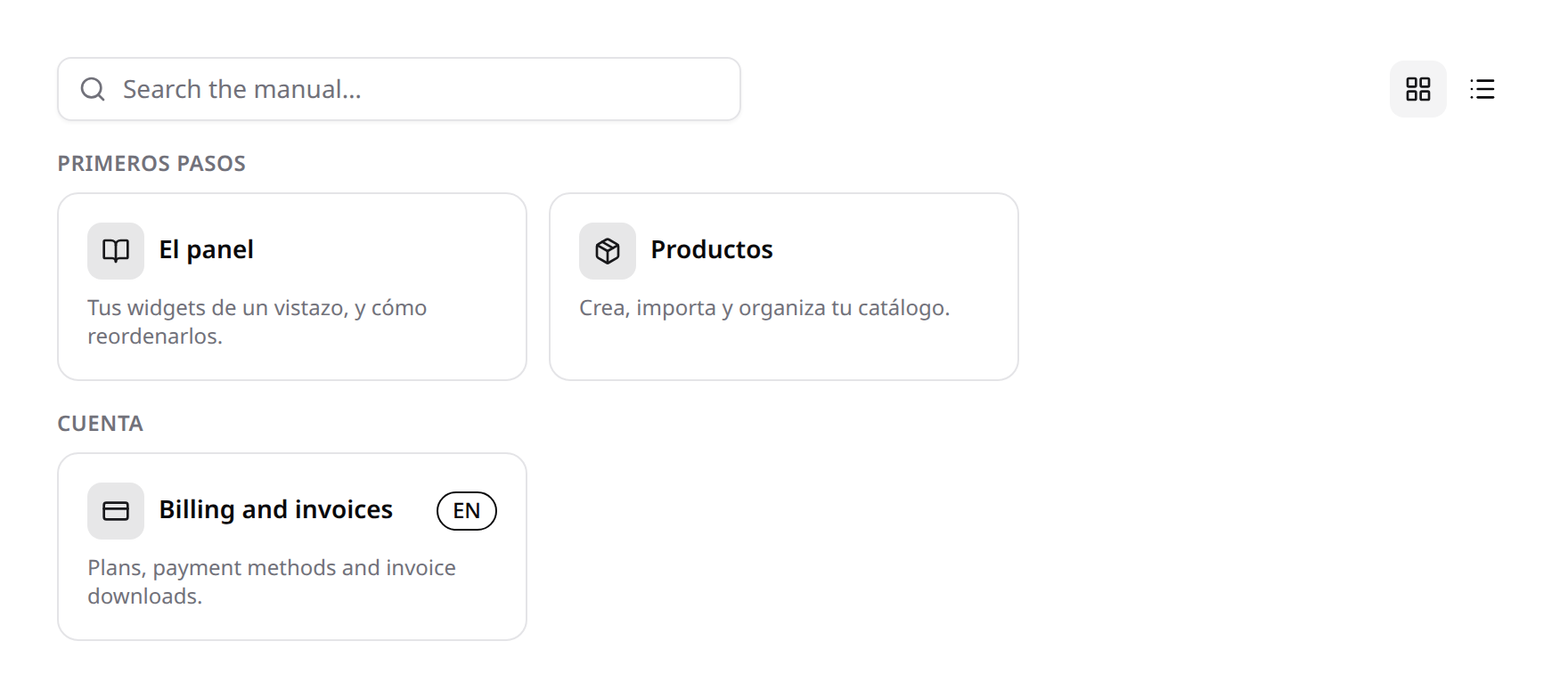
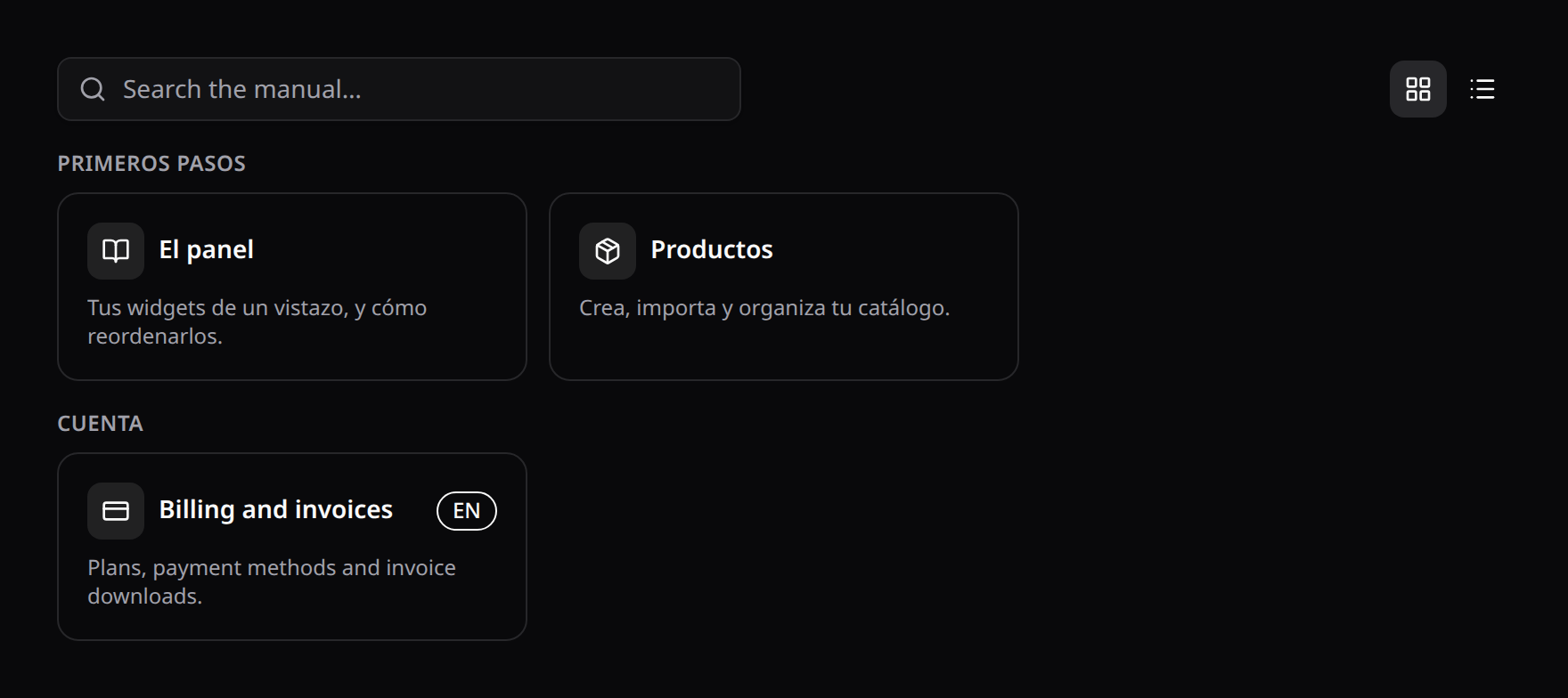
- The index groups by the
groupfront matter key; cards/list both link viaarticle-href(default:{current path}/{slug}— matching the scaffolded routes, teams included). - The article view builds an "on this page" TOC from
h2/h3headings with scroll tracking, renders prev/next from the same permission-filtered order as the index, and routes internal markdown links through Inertia.
Spotlight
With kinetix.spotlight.enabled, help articles automatically appear in the global command palette (permission-filtered). Result links resolve through the help.show named route (configurable via kinetix.help.show_route).
5. Config reference
'help' => [
    'enabled'    => env('KINETIX_HELP_ENABLED', false),
    'path'       => env('KINETIX_HELP_PATH'),        // null = resource_path('help')
    'show_route' => 'help.show',                     // Spotlight link target

    // Languages the manual may be served in. Null = infer: the Locale
    // module's locales, else the variants found on disk. A request can only
    // ask for a locale on this list.
    'locales' => null,

    // Language the base `{slug}.md` files are written in, and the last resort
    // before serving that base file. Null = config('app.fallback_locale').
    'fallback_locale' => env('KINETIX_HELP_FALLBACK_LOCALE'),

    // Hide articles with no variant in the active language instead of serving
    // them in the fallback one.
    'hide_untranslated' => env('KINETIX_HELP_HIDE_UNTRANSLATED', false),

    'cache' => [
        'enabled'  => env('KINETIX_HELP_CACHE', false),      // index only; HTML is
        'ttl'      => env('KINETIX_HELP_CACHE_TTL', 3600),   // never cached (per-user gating)
        'strategy' => env('KINETIX_HELP_CACHE_STRATEGY', 'fingerprint'),
    ],
    'screenshots' => [ /* see §3 */ ],
],
Cache strategy. fingerprint (default) keys the per-language index on the article files' mtimes, so an edit is visible immediately — right for authoring and staging. ttl skips that per-request stat entirely and lets entries expire on the TTL — right for production, where articles ship with a deploy. Either way the index holds metadata and the plain-text search corpus, built with one read per article; the rendered HTML is never cached because it is permission-gated per user.