

Alerts
<KinetixAlert> is the in-page alert: a status-colored surface with an icon, a title, a message and optional actions. Use it for anything the user should read where they are working — "your trial ends in 3 days", "this record is locked", "import finished with 12 skipped rows".
It closes for as long as you decide (this page, this tab, this browser or the account), animates with a named preset you can switch off, and is built to be read by screen readers and colorblind users without extra wiring.
The component
<script setup lang="ts">
import KinetixAlert from '@/components/kinetix/KinetixAlert.vue';
</script>

<template>
    <KinetixAlert
        color="warning"
        :title="t('billing.trial_ending_title')"
        :description="t('billing.trial_ending_body')"
    />
</template>
The default slot replaces description when you need markup, and #actions adds buttons or links under the message:
<KinetixAlert color="danger" :title="t('billing.payment_failed')">
    {{ t('billing.payment_failed_body') }}

    <template #actions>
        <Link :href="route('billing')" :class="buttonVariants({ size: 'sm' })">
            {{ t('billing.update_card') }}
        </Link>
    </template>
</KinetixAlert>
#title and #icon slots exist too.
Colors and surfaces
color takes the Kinetix status colors — success, danger, warning, info, primary and gray (the default). variant picks the surface:
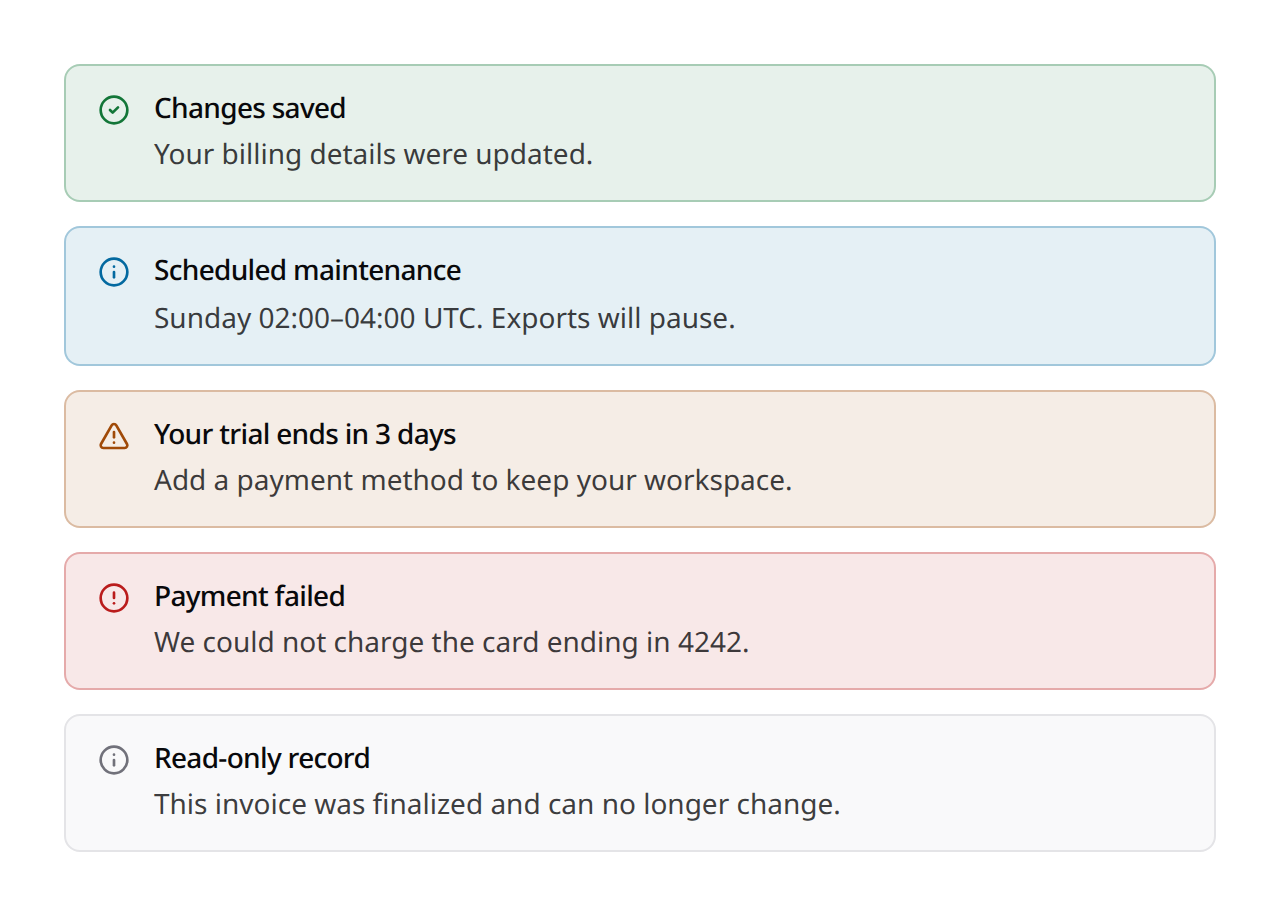
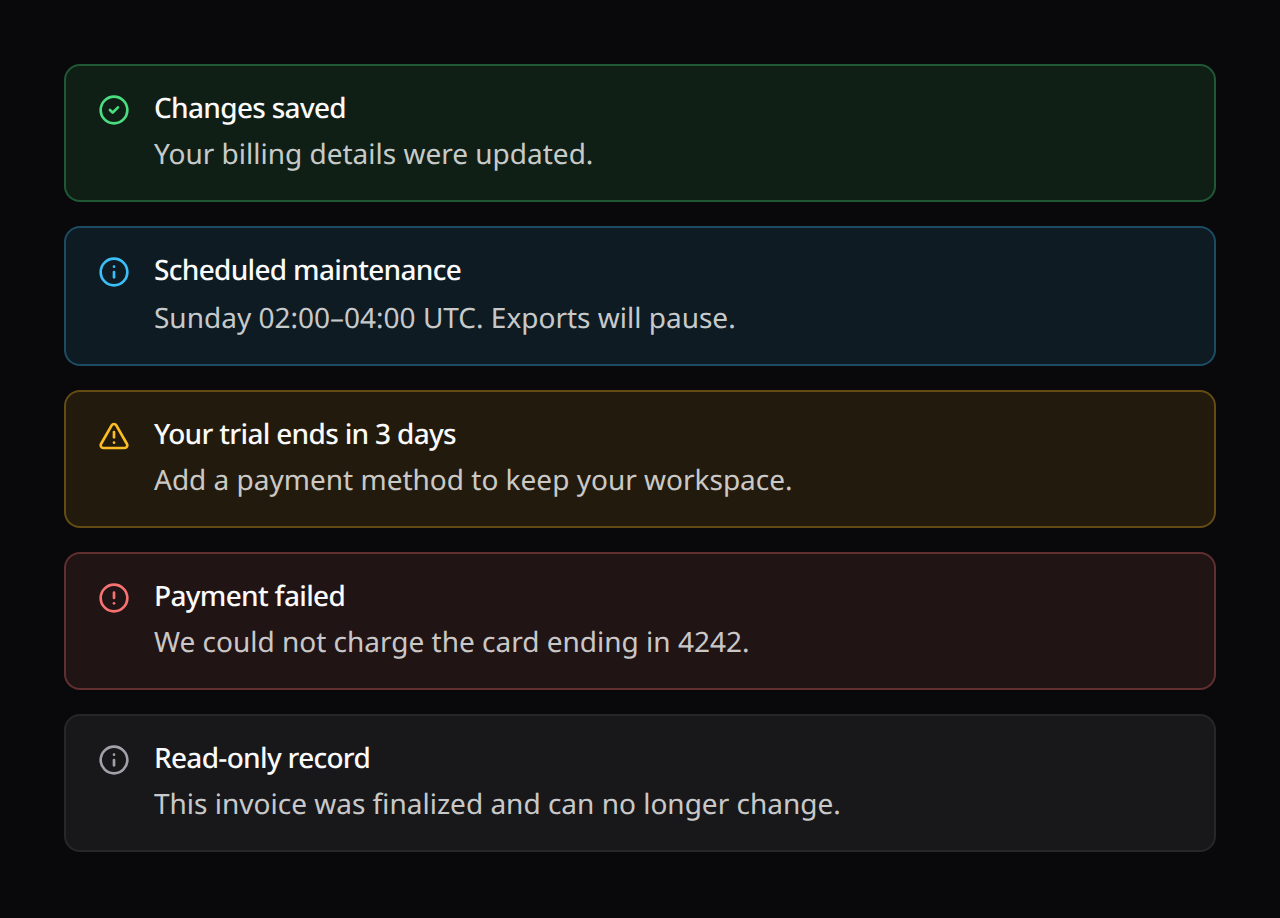
variant | Surface |
|---|---|
soft (default) | Tinted background with a matching border |
outline | Plain background, status-colored border |
accent | Card background with a thick status-colored edge |
solid | Filled with the status color; text takes the fill's own color |
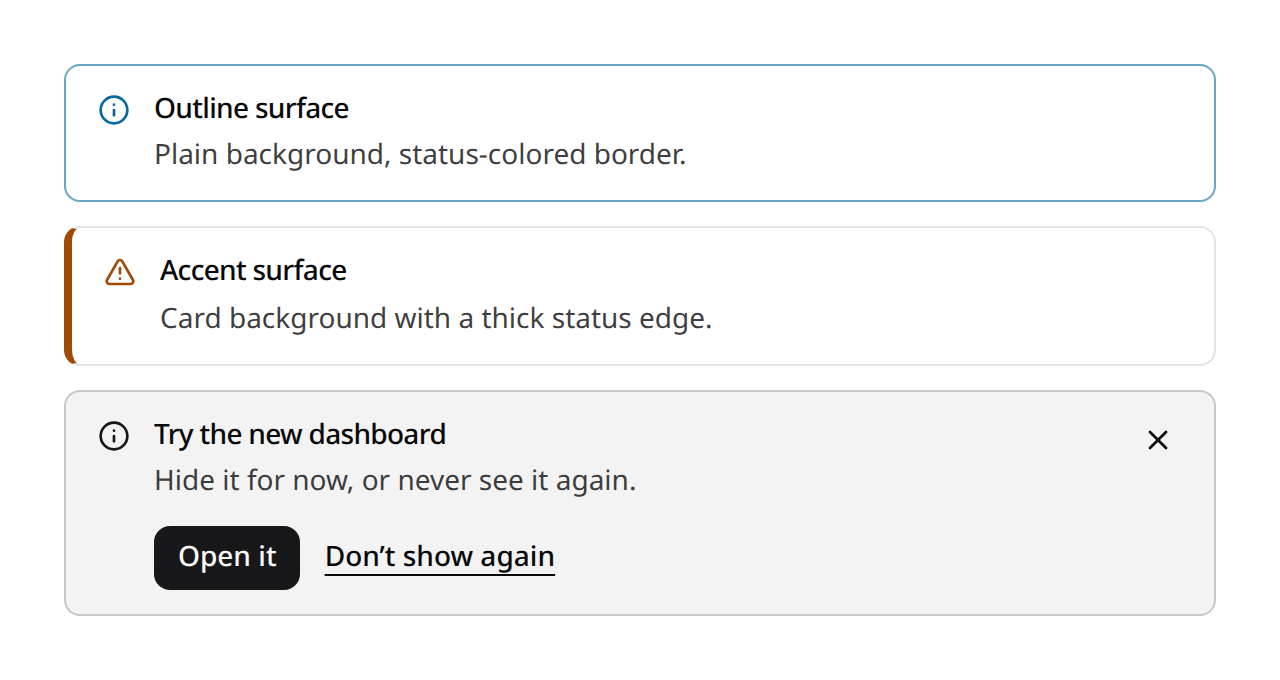
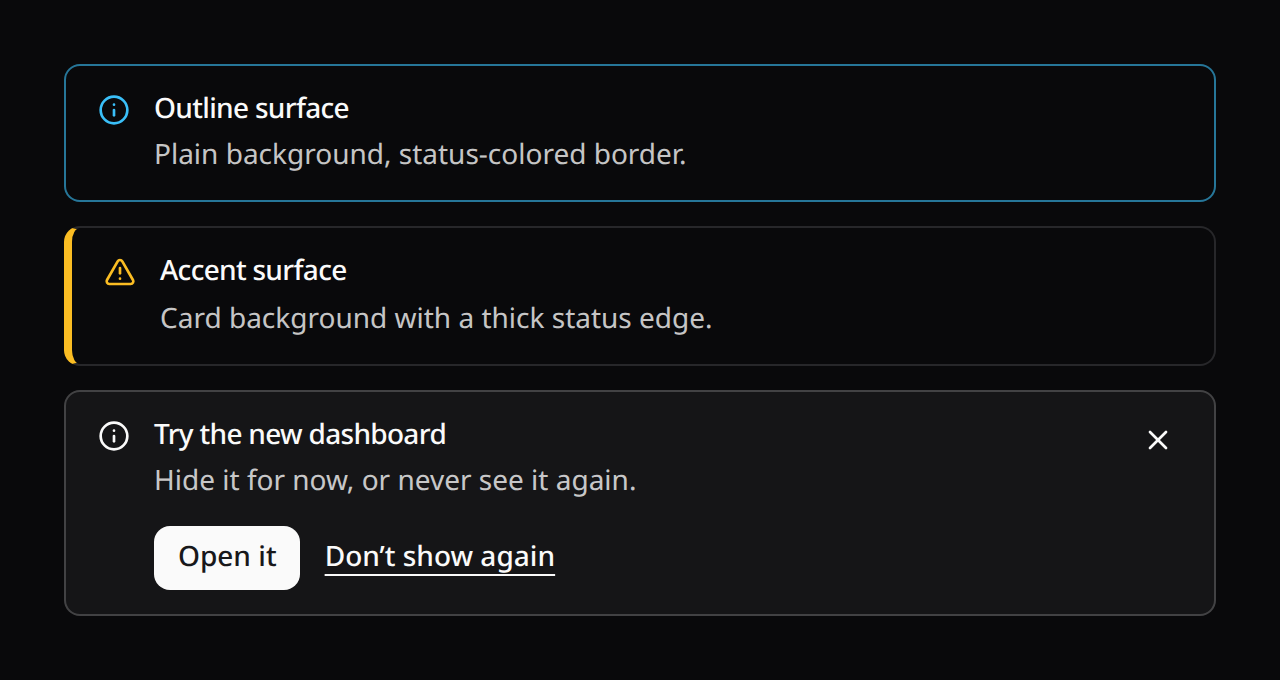
<KinetixAlert color="success" variant="soft" title="Saved" />
<KinetixAlert color="info" variant="outline" title="Heads up" />
<KinetixAlert color="danger" variant="accent" title="Payment failed" />
On soft, outline and accent only the surface and the icon take the color; the title and message stay on the foreground tokens. solid fills the surface, and the icon, text and close button take the fill's own text color (the status token's -foreground; white on red for danger, which dims in dark mode the way the destructive button does).
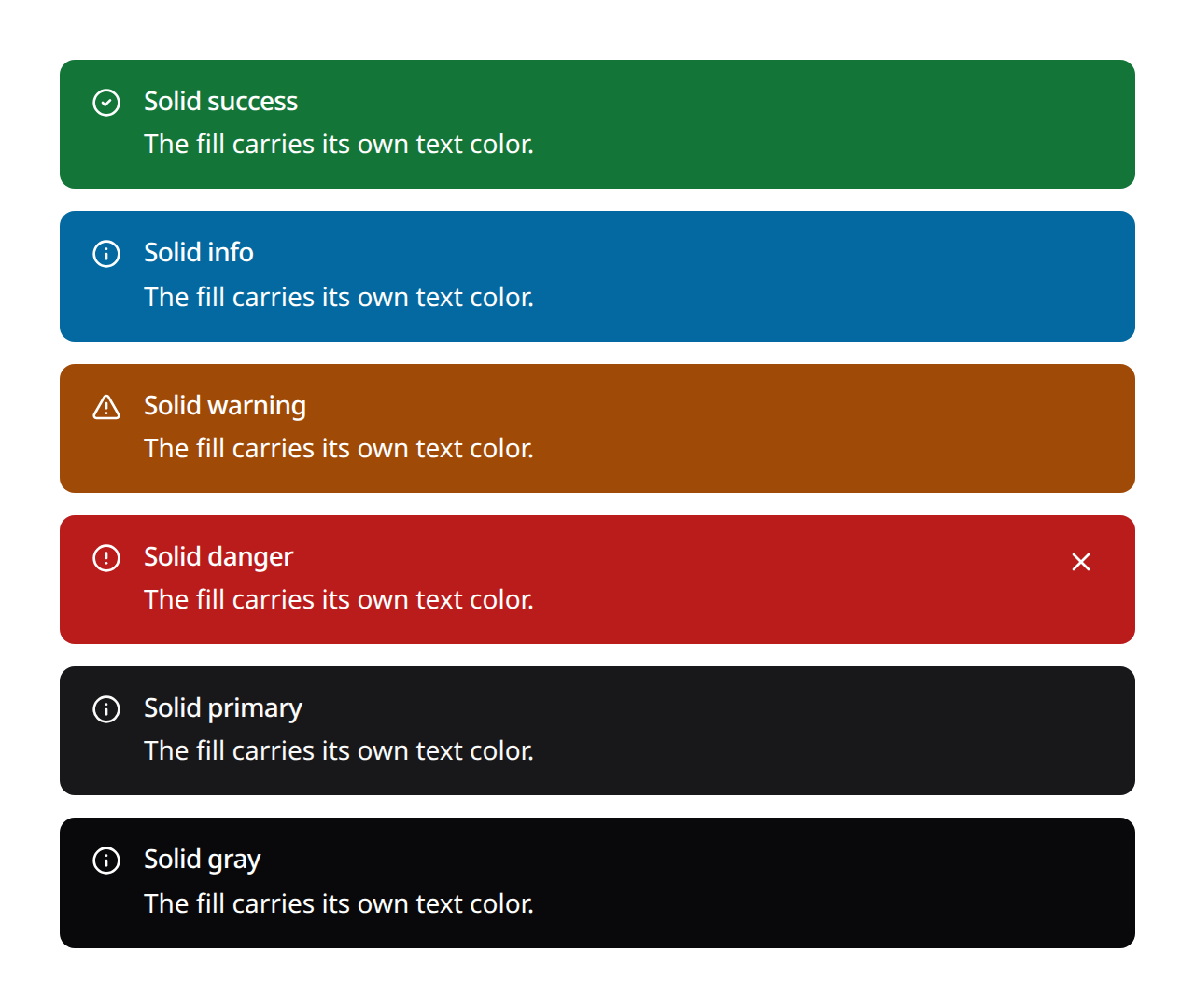
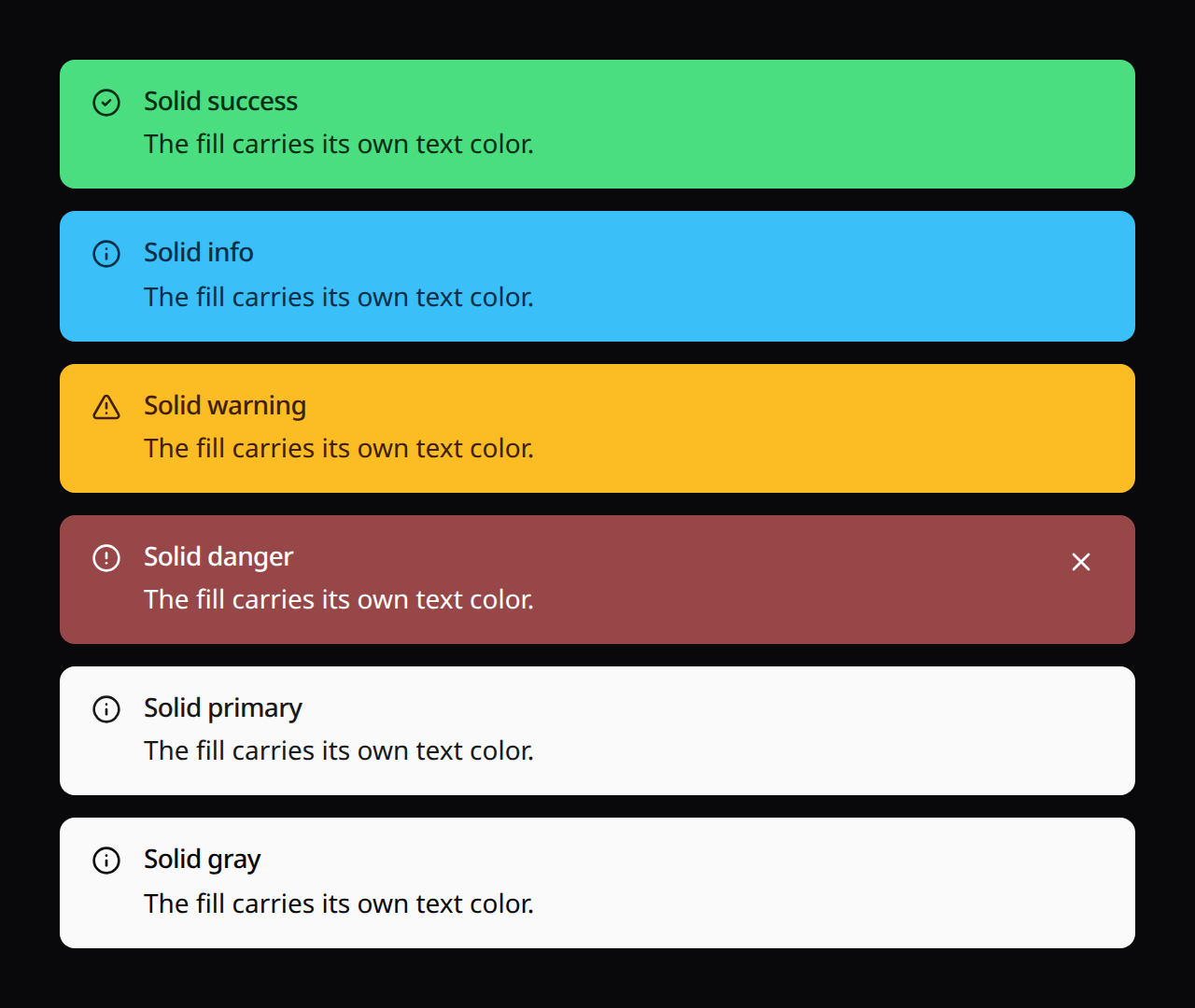
Every pairing reads at 4.5:1 or better in both light and dark mode with the tokens Kinetix ships, and a test keeps it that way. The colors come from the same --success, --warning, --info and --destructive tokens as the rest of Kinetix, so a theme override changes alerts too. If you override them, keep the same three pairings readable (see Installation → Theming).
The icon follows the color (a check for success, an alert circle for danger, a triangle for warning, an info circle otherwise). Pass any registered icon name or a component as icon to change it, or :icon="false" to drop it.
Closing
dismissible adds the close button. dismissMode decides how long the alert stays closed:
dismissMode | Stays closed | Needs |
|---|---|---|
hide (default) | Until this component mounts again (next page) | — |
session | For this browser tab, until it is closed | dismissKey |
device | In this browser, across tabs and restarts | dismissKey |
permanent | For the account, on every device | dismissKey + the Dismissals module or persist |
<!-- Gone for this tab -->
<KinetixAlert dismissible dismiss-mode="session" dismiss-key="welcome-tips" … />

<!-- Gone on this browser for a week, then back -->
<KinetixAlert
    dismissible
    dismiss-mode="device"
    dismiss-key="survey-2026"
    :dismiss-duration="7 * 24 * 60 * 60 * 1000"
    …
/>
dismissKey names the alert. It must be unique per message: change it when the message changes and the alert shows again for everyone who closed the old one. Closes are stored per signed-in user, so two accounts sharing a browser don't close each other's alerts. A device close made in one tab closes the alert in the user's other open tabs too.
For good, on every device
Only a server can remember a close across devices. Turn on the Dismissals module and permanent needs no wiring at all:
php artisan vendor:publish --tag=kinetix-dismissals-migrations
php artisan migrate// config/kinetix.php
'dismissals' => [
'enabled' => env('KINETIX_DISMISSALS_ENABLED', true),
],<KinetixAlert
color="info"
:title="t('profile.complete_title')"
dismissible
dismiss-mode="permanent"
dismiss-key="complete-profile"
/>The close is stored per user (kinetix_dismissals table), and every Inertia response carries the user's closed keys as the kinetix_dismissals prop, so the alert renders closed from the first frame on every device. With a dismiss-duration the close lapses on the server too ("remind me in 30 days"). Re-opening it through v-model:open takes the close back. To skip an alert on the server entirely:
use Happones\Kinetix\Dismissals\KinetixDismissals;

if (! KinetixDismissals::has($request->user(), 'complete-profile')) {
    // …share what the alert needs
}

KinetixDismissals::dismiss($user, 'complete-profile', now()->addDays(30));
KinetixDismissals::restore($user, 'complete-profile');| Method | Route | Name |
|---|---|---|
POST | {prefix}/dismissals | kinetix.dismissals.store |
DELETE | {prefix}/dismissals/{key} | kinetix.dismissals.destroy |
Both are behind your kinetix.middleware (auth). Keys are what you pass as dismiss-key: letters, digits and . _ : -, up to 191 characters.
Closing is optimistic: the alert goes away at once and comes back if the server rejects the close (the component emits dismiss-error).
Your own storage
To store closes somewhere else, pass a persist callback. It wins over the module. Without either one, permanent behaves like device.
<script setup lang="ts">
import { kinetixFetch } from '@/composables/useKinetixHttp';

// Your endpoint: store `key` against the user. kinetixFetch sends the CSRF
// token and rejects on a non-2xx answer, which re-opens the alert.
const saveDismissal = (key: string) =>
    kinetixFetch('/profile/dismissals', { method: 'POST', body: { key } });
</script>

<template>
    <KinetixAlert
        v-if="!$page.props.dismissed.includes('complete-profile')"
        color="info"
        :title="t('profile.complete_title')"
        dismissible
        dismiss-mode="permanent"
        dismiss-key="complete-profile"
        :persist="saveDismissal"
    />
</template>
Then render the alert only when your server says it isn't closed. Either way, a page that Back or Forward restores from the browser history still carries the props it had before the close, so the tab also remembers the close and keeps the alert hidden on that page.
Hide for now, or don't show again
dont-show-again gives the user both choices: the ✕ follows dismissMode (typically session), and a Don't show again link closes it for good (permanent with the Dismissals module or a persist, device without):
<KinetixAlert
    dismissible
    dismiss-mode="session"
    dont-show-again
    dismiss-key="beta-feedback"
    :persist="saveDismissal"
    …
/>
The close button reads Dismiss when the close lasts and Hide for now when it doesn't.
Controlled visibility
v-model:open lets the page show and hide the alert itself. Setting it back to true after a close shows the alert again and forgets the stored close. @dismiss reports the mode each close used.
Flashed from the server
A controller can send an alert to the next page, the way it sends a toast. Mount the outlet once, where page-level messages belong (under the page header is typical):
<KinetixFlashAlerts />use Happones\Kinetix\Flash\KinetixFlash;
KinetixFlash::alert(__('billing.payment_failed'), 'danger')
->description(__('billing.payment_failed_body'));
return back();The builder sends itself when the statement ends; ->send() exists for when you want to be explicit. It takes ->description(), ->color() (or ->success() / ->danger() / ->warning() / ->info()), ->variant(), ->icon(), ->dismissible(false) and ->id().
By default the alert shows on the next page only. It travels on Inertia's flash channel, which the browser history never stores, so Back doesn't bring it back. It stays through polls and partial reloads of that page and leaves when the user moves to another one.
Keep it longer
| Call | Shows |
|---|---|
| (default) | On the next page |
->keep(2) | On the next page and the 2 page visits after it |
->untilDismissed() | On every page until the user closes it (this session) |
// Every page until it's closed — safe to send on every request (a middleware,
// say): an id the user already closed stays closed for the session.
KinetixFlash::alert(__('auth.verify_email'), 'warning')
    ->id('verify-email')
    ->untilDismissed();

// The app fixed it on its own: withdraw it without counting it as closed.
KinetixFlash::forget('verify-email');
Kept alerts live in the session and reach the page as the kinetix_alerts prop. Closing one is reported to POST {prefix}/flash/{id}/dismiss (route kinetix.flash.dismiss), which needs the session but no login, so it works on guest pages too. Hovering a link that prefetches the next page doesn't use up a showing of a keep() alert.
From the client, useKinetixFlash().alert(title, { color, description }) flashes a one-shot alert without a request.
Inertia's flash channel exists from inertia-laravel 2.0.16 on. On an older 2.x the same toasts and alerts ride a kinetix_flash page prop instead; the toaster and the outlet read it, once per id, so nothing changes in your code. In a test, KinetixFlash::flashed() returns what is waiting for the next page whichever channel carries it.
New one-shot alerts are announced to screen readers when they arrive. A danger alert already interrupts as role="alert", so it isn't announced twice.
Animations
transition picks how the alert enters and leaves:
transition | Motion |
|---|---|
fade (default) | Opacity only |
slide-down | Fades in from slightly above |
slide-up | Fades in from slightly below |
scale | Fades in from 95% |
collapse | Grows from zero height, so the content below glides instead of jumping |
none | No motion |
The first render doesn't animate, because a page load shouldn't move. Pass appear for an alert that does want to animate in on mount.
All presets run between 150 and 300ms. They stop when:
- the OS asks for reduced motion (
prefers-reduced-motion: reduce); - the user turned on Reduce motion in the accessibility preferences;
- the app turns motion off for everyone:
// config/kinetix.php
'motion' => env('KINETIX_MOTION', 'full'), // full | reduced
kinetix.motion = 'reduced' stills every Kinetix transition preset and stops auto-rotating carousels such as the announcement banner.
The presets are available to your own components:
import { useKinetixTransition } from '@/composables/useKinetixTransition';

const transition = useKinetixTransition(() => props.transition); // reactive
// <Transition v-bind="transition"> … </Transition>
useKinetixReducedMotion() returns a reactive boolean that combines the three sources above. Use it for motion CSS can't stop, such as a timer.
Accessibility
- Role from the color. With
role="auto"(the default),dangerisrole="alert", which screen readers announce right away. Every other color isrole="status", which they announce politely.role="region"makes it a landmark named by its title (orlabel), androle="none"drops the role. - Never color alone. Each color carries its icon (hidden from screen readers) and a visually-hidden prefix read before the title: "Success:", "Error:", "Warning:" or "Information:", translated. Override it with
sr-label, or pass:sr-label="false"to drop it. - Headings when they belong. The title is a plain paragraph by default.
:heading-level="3"renders it as an<h3>, when the alert belongs in the page's outline. - Focus isn't lost on close. When the close button had focus, focus moves to the next control on the page (or the previous one at the end), not back to the top. The close is announced: "Message dismissed." or "Message hidden for now."
- Targets. The close button is 32px, above the 24px minimum.
Props
| Prop | Default | What it does |
|---|---|---|
color | gray | success · danger · warning · info · primary · gray |
variant | soft | soft · outline · accent · solid |
icon | per color | Icon name, component, or false |
title | — | Title text (or #title) |
description | — | Message text (or the default slot) |
heading-level | — | Render the title as h2…h6 |
role | auto | auto · alert · status · region · none |
label | — | Accessible name (for region) |
sr-label | per color | Hidden status prefix; false for none |
dismissible | false | Show the close button |
dismiss-mode | hide | hide · session · device · permanent |
dismiss-key | — | Unique name, required to remember a close |
dismiss-duration | — | ms until a session/device close lapses |
persist | — | (key) => Promise for permanent (overrides the Dismissals module) |
dont-show-again | false | Add the "Don't show again" link |
transition | fade | Animation preset (see above) |
appear | false | Animate the first render too |
v-model:open | true | Controlled visibility |
Events: dismiss(mode), dismiss-error(error), update:open.
The close logic is available without the component, too. useKinetixDismissal(key, { mode, duration, persist }) returns { dismissed, dismiss(mode?), restore() }. useKinetixDismissalStore() is the per-user ledger underneath it (isDismissed, remember, forget), for a component that tracks many keys at once.
Strings are localized (alert_*, 7 locales).