

Inbox
The Kinetix Inbox is a team inbox for the lines of Channels. Every message that reaches a WhatsApp number or a Telegram bot lands in a conversation. The team answers from one screen:
- text and files;
- a reply to a specific message;
- internal notes the contact never sees;
- assignment and archiving.
Each person has their own unread count, and agents only see the lines they answer.
Installation
The inbox sits on top of Channels, so turn both on:
php artisan vendor:publish --tag=kinetix-inbox-migrations
php artisan migrate'inbox' => [
'enabled' => env('KINETIX_INBOX_ENABLED', false),
// Message files: null = kinetix.filesystem.private_disk. Keep it private.
'disk' => env('KINETIX_INBOX_DISK'),
'directory' => 'kinetix/inbox',
// What the team may attach: a size cap (KB) and MIME types ([] = any).
'max_upload_kb' => 16384,
'accepted_mimes' => ['image/jpeg', 'image/png', 'application/pdf', /* … */],
// The team's members: a callable array receiving the team key, or the
// team model's relation.
'members' => null,
'members_relation' => 'members',
// Link a new conversation to your own contact model.
'contact_resolver' => null,
// What the line sends outside the inbox (its phone, a bot the provider
// runs) shows in the thread too.
'mirror_sent' => true,
// Without broadcasting, how often (seconds) the inbox refreshes.
'poll' => ['list' => 15, 'thread' => 5],
],Files a contact sends are fetched on the queue, so run a worker.
1. The inbox
Mount <KinetixInbox> on a page of its own. It fills its container, so give it a height:
<script setup lang="ts">
import KinetixInbox from '@/components/kinetix/KinetixInbox.vue';
</script>

<template>
    <div class="h-[calc(100dvh-8rem)]">
        <KinetixInbox />
    </div>
</template>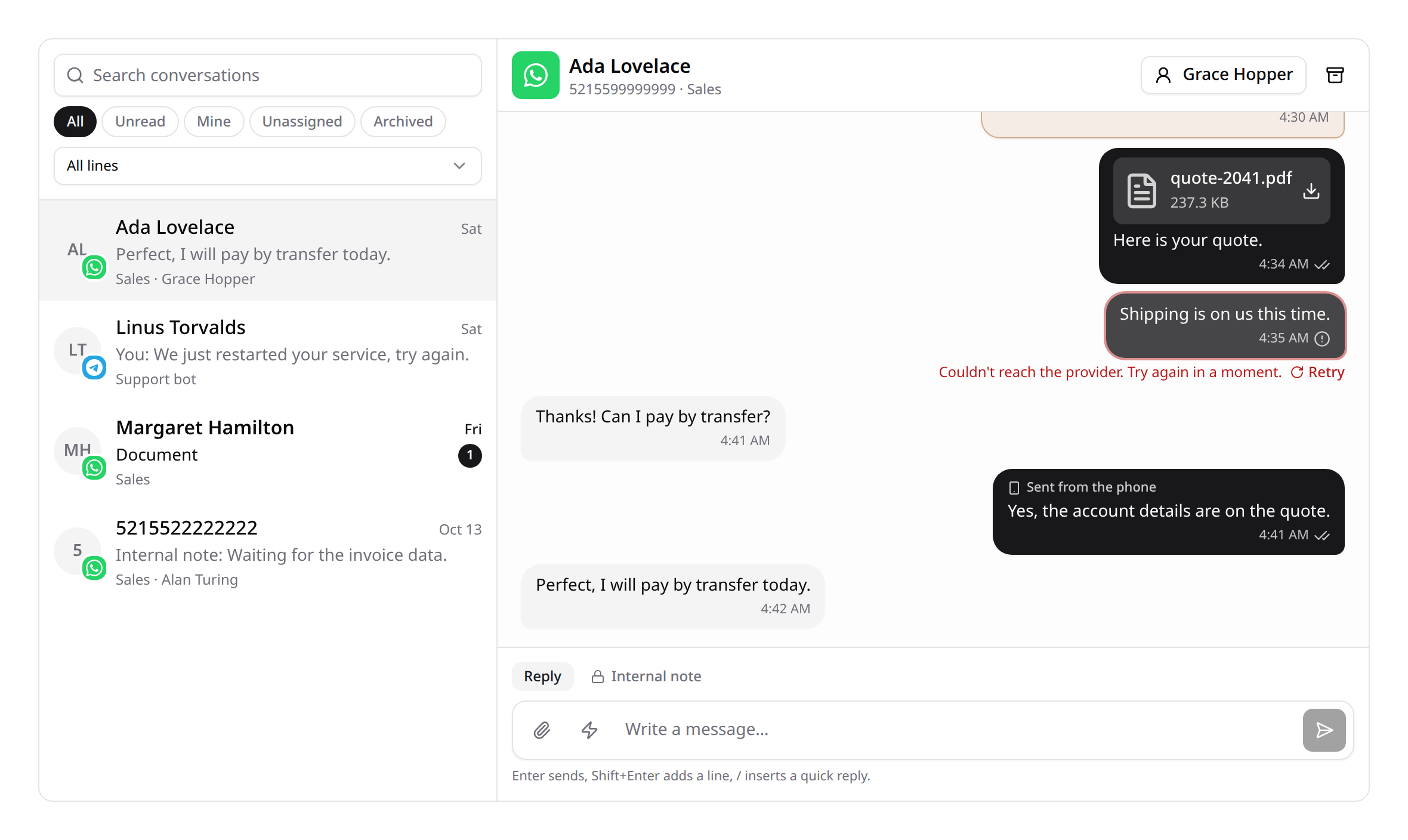
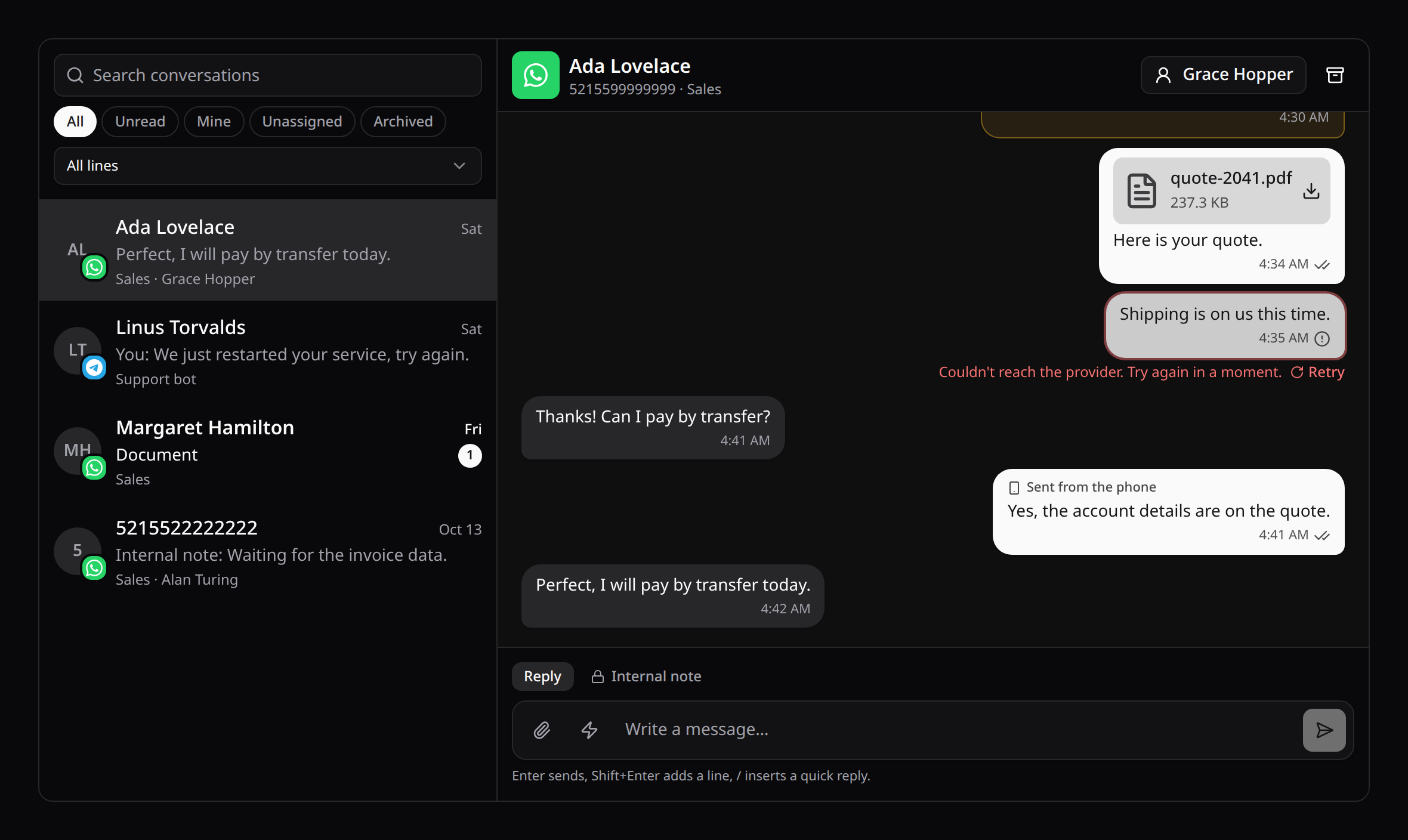
The list. It searches by contact, number or message text, and has filters: All, Unread, Mine, Unassigned and Archived. With several lines you can also pick one. Each conversation shows:
- its last message;
- when it arrived;
- your unread count;
- its line and its assignee.
More conversations load as you scroll.
The thread. Older messages load as you scroll up, separated by day. New ones follow while you're at the bottom.
- A message the team sent shows how far it got: sending, sent, delivered or read. WhatsApp reports delivery and reads; Telegram only confirms sending.
- A refused message stays in the thread, failed, with the reason and a Retry.
- Images open in the app's file preview when it's mounted, and in a new tab otherwise.
- Videos and voice notes play in place. Documents download.
The composer.
- Reply writes to the contact; Internal note writes only to the team.
- Enter sends; Shift+Enter breaks the line.
- Attach one file per message. It shows before sending, and the size limit is checked in the browser too.
- Hover a message (or focus it with the keyboard) and press Reply to answer it. The quote rides on top of your message and, on WhatsApp and Telegram, on the contact's phone.
Assignment and archive. The header assigns the conversation to anyone who sees its line, and archives it. An archived conversation comes back when the contact writes again.
On a phone, the list and the conversation take turns on screen, with a back button.
Props, events and slots:
| Name | What it does |
|---|---|
conversation prop | Opens a conversation on load (a deep link). |
@open | Reports the open conversation, or null, to keep it in the URL. |
#aside="{ conversation }" | A side panel for the open conversation (≥ xl): a customer card, orders. |
#empty | Replaces the "pick a conversation" panel. |
To build your own UI, use useKinetixInbox(). It powers the component and exposes:
- the list (
conversations,search,filter,channelId); - the thread (
active,messages); open,send,retry,assign,archive,unarchiveandmediaUrl.
2. Who sees what
| Ability | Sees |
|---|---|
conversations.view | The inbox, for the lines they're an agent of. |
conversations.view_all | Every line's conversations. |
channels.manage | Every line's conversations (they manage the lines). |
Agents are set per line. In <KinetixChannelManager>, a line's menu has Agents, which lists the team's members. Members who see every line show ticked and can't be taken off.
The rules apply everywhere:
- the list;
- every conversation, message and file endpoint;
- the realtime channels.
An agent never receives a conversation of a line they don't answer.
The members come from the team model's members relation, as in the Laravel starter kits. Point members_relation elsewhere, or set members to a callable array:
'members' => [App\Teams\Members::class, 'of'],public static function of(int|string|null $teamKey): iterable
{
return Team::find($teamKey)?->users ?? [];
}3. Unread, per person
Each person has their own read cursor. Opening a conversation reads it for you alone: a colleague still sees it unread until they open it. The Unread filter and the counts follow each person's cursor.
4. Live updates
With kinetix.channels.broadcast on and Laravel Echo configured, each line broadcasts inbox.updated on the private channel kinetix.inbox.{line id}. Kinetix authorizes it for whoever sees that line.
The event carries ids only. The inbox fetches what changed through its authorized endpoints, so no message content travels over the socket.
Without broadcasting, the inbox polls instead:
- the list every
poll.listseconds; - the open conversation every
poll.threadseconds.
A hidden tab doesn't poll.
5. Your contacts
To link each new conversation to your own contact model, set a resolver:
'contact_resolver' => [App\Inbox\Contacts::class, 'for'],public static function for(Conversation $conversation): ?Model
{
return Contact::firstOrCreate(
['team_id' => $conversation->team_id, 'phone' => $conversation->contact_key],
['name' => $conversation->contact_name],
);
}The conversation's contactable relation then points at it, which is handy in the #aside panel or in a listener.
6. Hooks
| Event | When |
|---|---|
ConversationMessageCreated | A contact's message was recorded (deduplicated). |
ConversationMessageCreated is the hook for bots and flows. It carries the Conversation and the ConversationMessage. Answer through the inbox so the reply shows in the thread:
use Happones\Kinetix\Inbox\Events\ConversationMessageCreated;
use Happones\Kinetix\Inbox\InboxManager;

Event::listen(function (ConversationMessageCreated $event): void {
    if (str_contains((string) $event->message->body, 'horario')) {
        app(InboxManager::class)->send($event->conversation, $botUser, 'Abrimos de 9 a 18 h.');
    }
});
The Channels events (ChannelMessageReceived, …) keep firing as before.
7. Quick replies
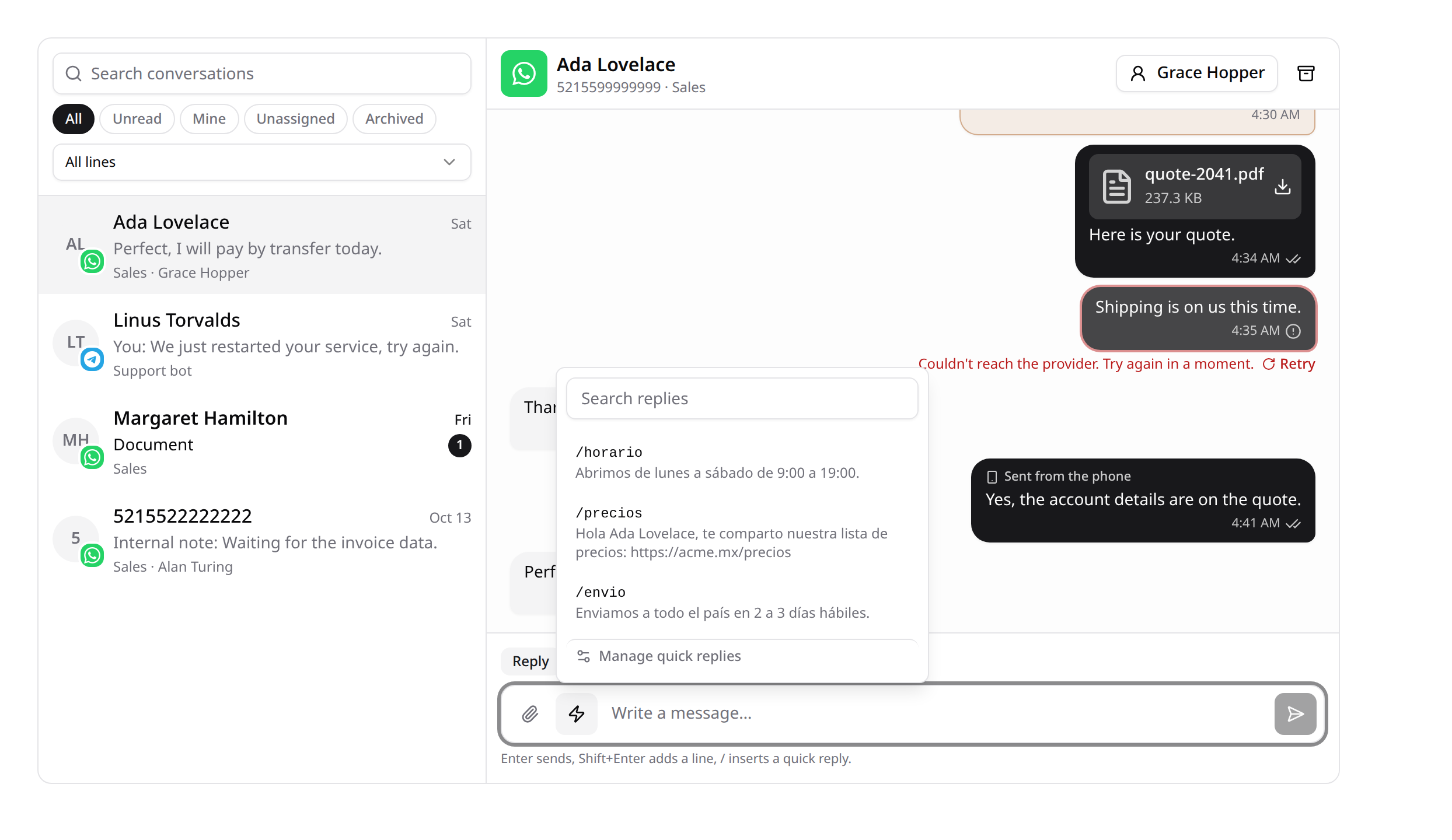
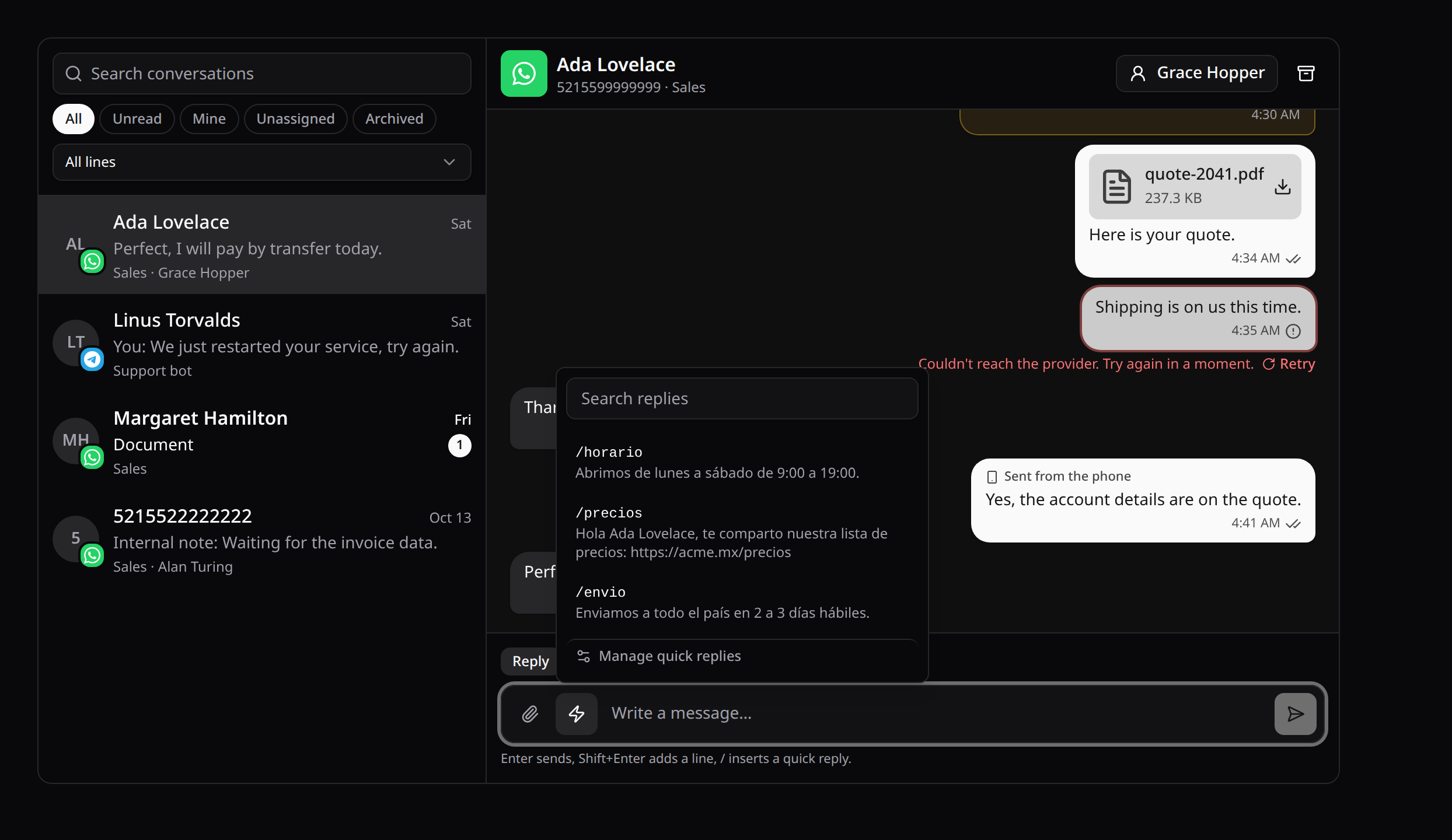
Quick replies are the team's saved answers.
- Insert one: type
/and its shortcut at the start of a word in the composer. The suggestions filter as you type: ↑ and ↓ move, Enter or Tab inserts, Esc closes. The lightning button lists them all, with a search. - Where it goes: a reply goes in where the cursor is (or replaces the
/shortcutbeing typed), so you can edit it before sending. - Variables: these four are filled in for the open conversation: the contact's name and number, the agent's name, and the line's name.
They are written {{contact.name}}, {{contact.key}}, {{agent.name}} and {{line.name}}.
Everyone with conversations.view uses them. conversations.quick_replies creates, edits and deletes them, from Manage quick replies in the picker. A shortcut is one word (letters, numbers, - and _), unique in the team.
The migration ships in kinetix-inbox-migrations. Publish it again after upgrading.
8. Bots
With Flows on:
- bots answer conversations, and their messages show in the thread signed with the flow's name;
- the thread shows which bot is answering, with Stop;
- its bot menu starts any active flow of the line by hand;
- when someone on the team replies, the bot steps back.
Messages sent outside the inbox
A WhatsApp line also sends messages the inbox didn't write. They show in the thread too, on the team's side, so the conversation reads whole:
- From the phone. What someone types in WhatsApp on the linked phone is marked Sent from the phone. It counts as a person answering: a flow talking there steps back.
- From a bot the provider runs (a bot behind the line). Its answers are signed with the bot's name, or Bot. The integration behind it never shows.
Each one is recorded once, and none counts as unread. The inbox's own messages come back from the line too, sometimes before the send finishes; they're matched to the message already in the thread instead of showing twice. One marked failed after a timeout although it went out turns sent.
Turn it off with 'mirror_sent' => false. Lines set up before this listen for their bot's sends after a Restart, or when a bot is attached.
Notes
- A message that arrives twice is recorded once: the provider's id is unique per conversation.
- A delivery receipt never moves a message back. A late delivered doesn't undo read, and a failure after delivery is ignored.
- Files are stored on a private disk and served only through the inbox's own endpoint, to people who see the conversation.